
Let’s be honest—switching between ten different apps just to get work done is exhausting. You’re copying data from Gmail to your CRM, manually updating spreadsheets, and wondering why “digital transformation” feels like more work, not less.
Here’s the good news: Google Workspace integrations can fix that.
When you connect your favorite tools to Gmail, Drive, and Calendar, magic happens. Tasks that used to take hours now happen automatically. Your team actually knows what’s going on. And you finally have time to focus on work that matters.
In this guide, we’ll show you exactly how to integrate Google Workspace with the tools you already use—no tech degree required.
What Are Google Workspace Integrations?
Think of Google Workspace integrations as bridges between your apps.

Instead of manually moving information from one place to another, integrations do it automatically. When someone emails you in Gmail, it can create a task in Asana. When you schedule a meeting in Calendar, it can notify your team in Slack.
There are three main ways to connect apps to Google Workspace:
Google Workspace Marketplace apps offer pre-built connections. You’ll find over 5,000 options here—everything from project management tools to e-signature software. Installation takes about two minutes.
API integrations let developers build custom connections. This approach works when you need something specific that doesn’t exist yet. It’s more technical but incredibly powerful.
Automation platforms like Zapier and Make act as middlemen. They connect Google Workspace to thousands of other apps without requiring any coding knowledge.
💡 Need help setting up Google Workspace?
We’re certified Google partners offering 64% off + free professional setup ($2,000 value). Used by 151+ companies.
Get your quote →Why Integrate Google Workspace with Other Tools?
You might be wondering if integrations are worth the setup time.
The short answer? Absolutely.
Here’s what happens when you integrate third-party apps with Google Workspace:
Your team saves 5-10 hours per week on manual data entry. That’s time they can spend on actual work instead of copying information between systems.
Nothing falls through the cracks anymore. When your CRM automatically syncs with Gmail, you’ll never forget to follow up with a lead again.
Everyone stays on the same page. Real-time updates mean your team always has the latest information, whether they’re working from the office or their kitchen table.
Companies using Google Workspace integrations report 42% higher productivity compared to those using disconnected tools. That’s not a small difference.
The Best Google Workspace Integrations by Category
Let’s talk about specific tools that work brilliantly with Google Workspace.
CRM and Sales Tools
Salesforce integration with Google Workspace transforms how sales teams work. Your reps can log emails, schedule follow-ups, and update deals without leaving Gmail. The Google Workspace Salesforce connector syncs contacts automatically, so your database stays clean.
HubSpot offers similar benefits with easier setup. You’ll see contact information right inside Gmail, and every interaction gets logged automatically. Perfect for small businesses that need CRM integration for Google Workspace without complexity.
Pipedrive connects smoothly through the Google Workspace Marketplace. Sales teams love how it shows deal stages directly in their inbox.
Project Management Integrations
Asana and Google Workspace integration is a productivity game-changer. Turn emails into tasks with one click. Attach Drive files directly to projects. Get Calendar notifications for upcoming deadlines.
Monday.com takes visual project tracking to the next level. Your team can create tasks from Gmail, and status updates sync both ways. The Google Workspace API integration here is rock-solid.
Trello keeps things simple with its Google Drive integration for Workspace. Attach documents to cards, and everyone sees changes in real-time.
Communication Tools
Slack integration with Google Workspace bridges team chat and email perfectly. Share Drive files in channels, get Calendar reminders in Slack, and start Meet calls with a slash command.
The Microsoft Teams Google Workspace integration might sound odd, but it works. Many companies use both platforms, and this connection keeps communication flowing.
Zoom connects seamlessly for video conferencing. Schedule meetings from Calendar, and join links appear automatically in invites.
Automation Platforms
Zapier and Google Workspace together unlock incredible possibilities. Connect Gmail to 5,000+ apps without writing code. Create “Zaps” that trigger automatically when specific things happen.
Make (formerly Integrio) offers more advanced workflows. If you need complex automation for Google Workspace, this platform delivers impressive results.
IFTTT works great for simple connections. Set up Google Workspace third-party integrations in minutes, not hours.
Document Management
DocuSign integration lets you send, sign, and track documents without leaving Drive or Gmail. Legal teams and HR departments can’t live without this Google Workspace connector.
Adobe Sign provides similar functionality with superior PDF handling. Both integrate through the Google Workspace Marketplace apps section.
Box offers enterprise-grade storage with advanced security. The Box Google Workspace integration appeals to companies with strict compliance requirements.
How to Set Up Google Workspace Integrations
Setting up integrations for Google Workspace is easier than you think.
Method 1: Using the Google Workspace Marketplace
Visit workspace.google.com/marketplace and search for the app you want. Click “Install” and grant the necessary permissions. Most Google Workspace Marketplace integrations work immediately after installation.
The Marketplace includes ratings and reviews, so you can see what other users think before installing anything.
Method 2: Direct API Integration
For custom connections, you’ll work with the Google Workspace API. Visit console.cloud.google.com and create a new project. Enable the specific APIs you need—Gmail, Drive, Calendar, etc.
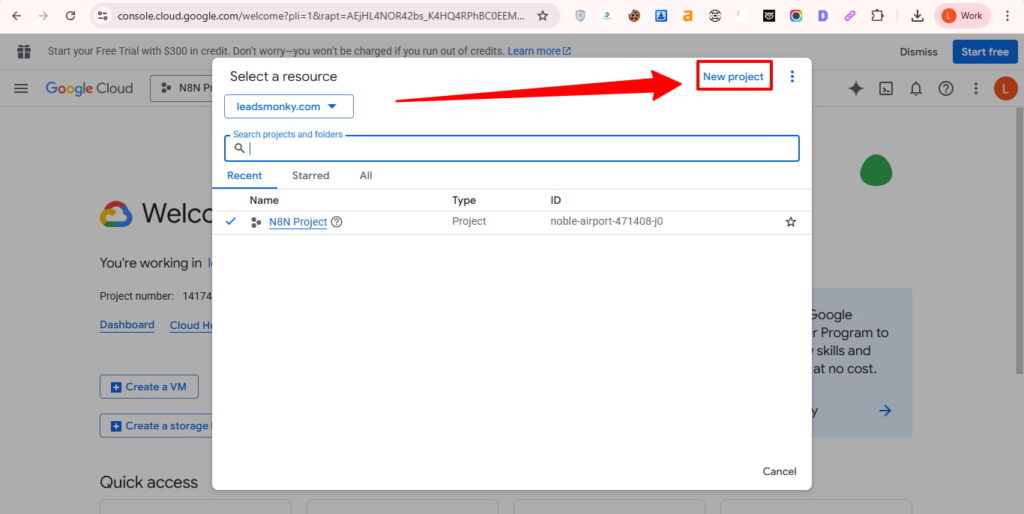
Generate credentials, then use them to integrate apps with Google Workspace programmatically. This method requires technical knowledge but offers unlimited flexibility.
Method 3: Automation Platforms
Sign up for Zapier or Make, then connect your Google Workspace account. Choose triggers (what starts the automation) and actions (what happens next). These platforms make integrating Google Workspace with other apps accessible to non-technical users.
Common Integration Challenges and Solutions
Even the best Google Workspace integrations occasionally hit snags.
Authentication errors happen when permissions expire. Simply reconnect the app and grant access again. This fixes 90% of connection issues.
Sync delays can frustrate users expecting instant updates. Most integrations refresh every 5-15 minutes, not instantaneously. If real-time sync matters, look for apps advertising instant synchronization.
Data mapping problems occur when field names don’t match between systems. For example, “Company Name” in your CRM might need to map to “Organization” in Google Workspace. Check the integration settings and adjust mappings manually.
API rate limits kick in when you’re syncing massive amounts of data. Google restricts how many requests apps can make per minute. The solution? Upgrade to a higher-tier integration plan or spread data transfers across more time.
Security Best Practices for Google Workspace Integrations
Integration security matters just as much as functionality.
Review permissions carefully before installing any Google Workspace connector. Apps should only request access to what they actually need. If a simple task app wants full Drive access, that’s a red flag.
Use Google Workspace Admin controls to manage which integrations your team can install. This prevents security risks from unauthorized third-party apps for Google Workspace.
Enable two-factor authentication on all integrated accounts. If someone compromises one system, they won’t automatically access everything else.
Audit your Google Workspace integrations quarterly. Remove tools your team no longer uses. Every connected app represents a potential security risk.
Measuring Integration Success
How do you know if your integrations for Google Workspace are actually working?
Track time saved on manual tasks. If you’re still copying data by hand, something’s wrong with your setup.
Monitor user adoption rates. The best Google Workspace integration examples show high engagement because they genuinely make work easier.
Measure error rates in data transfer. Quality API integrations with Google Workspace maintain 99%+ accuracy.
Calculate ROI by comparing integration costs against time savings. Most companies see positive returns within 3-6 months.
Getting Started Today
Ready to integrate Google Workspace with your business tools?
Start small with one high-impact connection. If your sales team lives in Gmail, begin with a CRM integration. If project chaos drives you crazy, try Asana or Monday.
Choose Google Workspace Marketplace apps for quick wins. These pre-built integrations require minimal setup and work reliably.
Consider automation platforms for connecting multiple tools simultaneously. Zapier integrations for Google Workspace can replace several individual connections.
Don’t try to integrate everything at once. Focus on solving your biggest pain point first, then expand gradually.
Your Next Steps
Google Workspace integrations transform how your team works—but only if you actually implement them.
Pick one integration from this guide that addresses your biggest frustration. Install it this week. Give your team two weeks to adapt, then measure the results.
You’ll be amazed at what becomes possible when your tools finally work together instead of against each other.
The future of work isn’t about using more apps—it’s about making the apps you have work smarter together.
Get Google Workspace at 64% Off
Same service. Better price. Professional setup included.
⭐⭐⭐⭐⭐ 151+ companies trust us
Partner Pricing:
• Business Starter: $3/month (Google: $8)
• Business Standard: $13/month (Google: $17)
• Business Plus: $20/month (Google: $26)
FREE:
Complete DNS setup + 24/7 support + USA IPs
15-user minimum | Setup in 24 hours


