
Managing three different brands with three separate email accounts? Switching between admin consoles just to add a user? There’s a smarter way.
Can Google Workspace have multiple domains? Yes. You can add multiple domains to Google Workspace—up to 600 in one account. That means one admin console, one billing system, but separate email addresses for each brand, division, or business unit you manage.
Here’s what makes this powerful: you’ll save money, simplify user management, and still maintain distinct brand identities. Whether you’re managing acquired companies, running multiple brands, or going through a rebrand, Google Workspace multiple domains keeps everything unified.
In this guide, you’ll learn the difference between alias and secondary domains, exactly what you’ll pay, and how to set everything up without breaking email delivery. Let’s dive in.
What Are Multiple Domains in Google Workspace?
Multiple domains in Google Workspace let you manage several domain names under one account. Think of it like having multiple storefronts but one back office.

Instead of logging into separate accounts for each brand, you control everything from a single Google Workspace admin console. Same storage pool. Same billing. One IT team managing multiple brands.
This works whether you need the same team using different email addresses or completely separate teams at different domains. The key is choosing the right domain type.
Understanding the Three Types of Domains
Every Google Workspace account has three domain types. Here’s what makes each one different.
Primary Domain
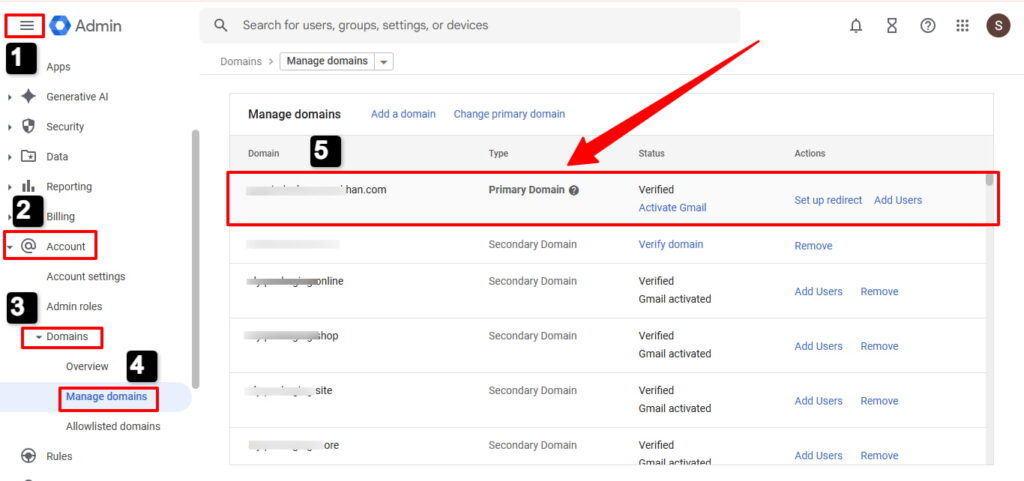
Your primary domain is the first one you register when signing up. Every account has exactly one. This is your “home base”—all admin settings, billing, and organizational units tie back to it.
You can change your primary domain later, but it requires migrating users. Most businesses keep their main brand as the primary.
Example: company.com
Alias Domain (User Alias Domain)
An alias domain gives your existing users additional email addresses. It’s completely free. No extra user licenses needed.
When you add an alias domain, every user automatically gets an email at both domains. Same inbox. Same Google Drive. Same person, two addresses.
Example: If your primary domain is company.com and you add brandname.com as an alias, then john@company.com automatically becomes john@brandname.com too.
Best for: Setting up shared mailboxes works seamlessly across alias domains, allowing teams to manage department emails like support@brand1.com and support@brand2.com from one interface Rebranding, multiple brand names with the same team, marketing campaigns, or giving professional addresses after acquiring a domain.
Secondary Domain
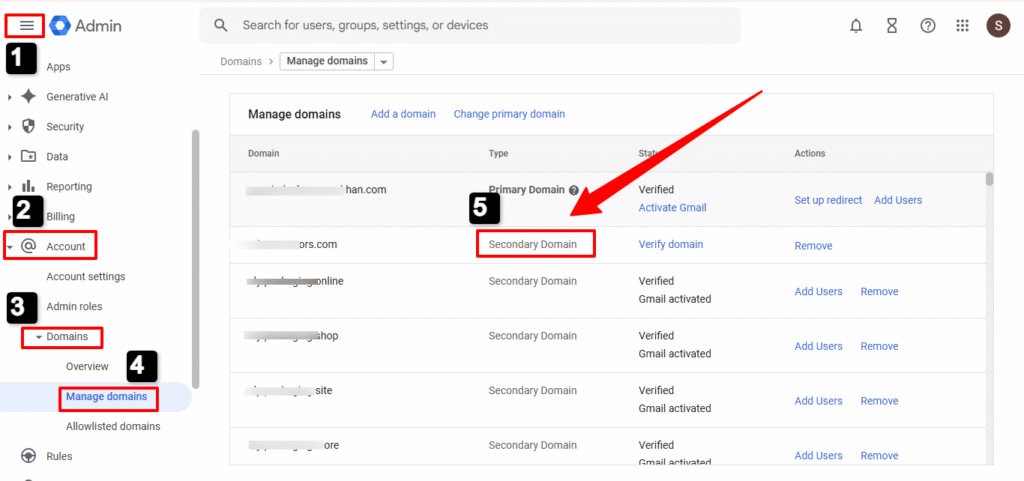
A secondary domain creates completely separate user accounts. Each user on a secondary domain gets their own mailbox, Drive storage, and Google Workspace account.
You pay for each user on secondary domains—same rate as your plan. If you’re on Business Starter at $8.40/user/month, each secondary domain user costs $8.40/month.
💡 Need help setting up Google Workspace?
We’re certified Google partners offering 64% off + free professional setup ($2,000 value). Used by 151+ companies.
Get your quote →Example: company.com (primary) + subsidiary.com (secondary). The john@company.com and john@subsidiary.com are different people with separate accounts.
Best for: Separate business units, acquisitions with existing teams, franchise operations, or regional offices with dedicated staff.
Quick Comparison: Which Domain Type Do You Need?
| Feature | Primary Domain | Alias Domain | Secondary Domain |
| Cost | Included | FREE | Paid per user |
| User Accounts | Yes | No (uses primary) | Yes (separate) |
| Limit | 1 only | 20 max | 599 max |
| Same Team? | ✓ | ✓ | ✗ Different teams |
| Separate Inbox | ✓ | ✗ Shared inbox | ✓ |
Simple decision rule: Same people need emails at multiple domains? Use alias. Different people at different domains? Use secondary.
Cost Breakdown: What You’ll Actually Pay
Here’s where most guides fail you. Let’s talk real numbers.
Alias Domain Pricing
Alias domains are 100% free. You can add up to 20 alias domains without increasing your Google Workspace bill.
Example:
- 10 users on Business Standard ($12/user/month)
- Monthly cost: $120
- Add 5 alias domains: Still $120/month
- Savings: $0 extra cost
Every user automatically gets email addresses at all alias domains. No setup per user required.
Secondary Domain Pricing
Secondary domains require separate user licenses. Each person you add costs the same as your plan rate.
Example:
- Primary: company.com (10 users × $12 = $120/month)
- Secondary: newbrand.com (5 users × $12 = $60/month)
- Total: $180/month for 15 users
Real Cost Comparison
Let’s say you manage 3 brands with the same 20-person team:
Using Alias Domains: $240/month (20 users) Using Secondary Domains: $720/month (60 user licenses)
Annual savings with alias: $5,760
That’s why understanding the difference matters. Most businesses waste money using secondary domains when alias domains would work perfectly.
Add Domains Google Workspace 2026: Complete Step-by-Step Guide
Ready to add multiple domains? Here’s the exact process.
Adding an Alias Domain (5 Minutes)
Step 1: Sign into admin.google.com with your administrator account.
Step 2: Navigate to Menu → Account → Domains → Manage domains.
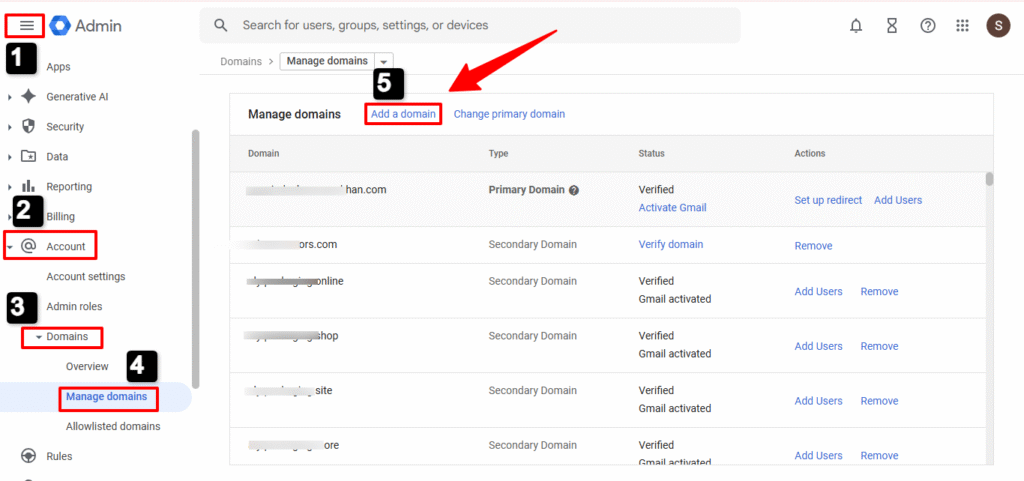
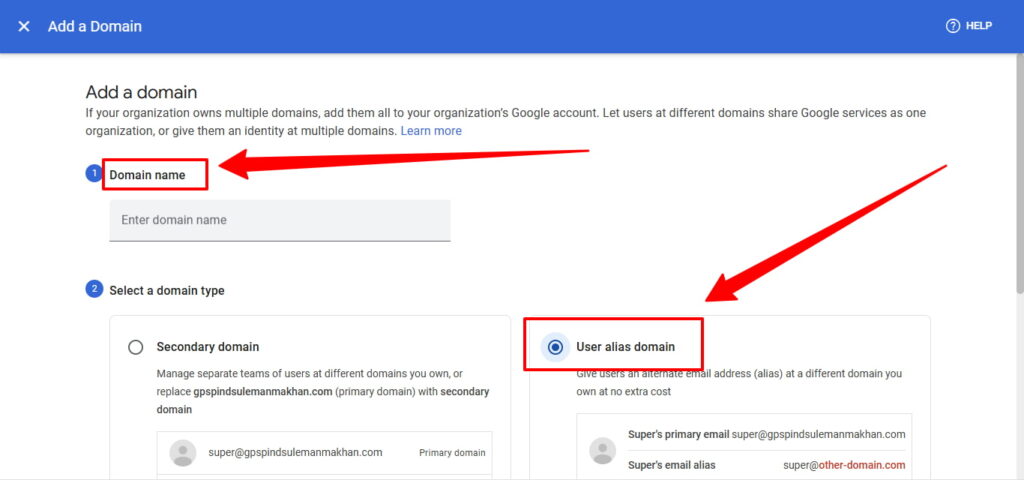
Step 3: Click “Add a domain”. Enter your domain name. Select “User alias domain” (not secondary). Click “Add domain and start verification”.
Step 4: Verify ownership. Google gives you a TXT record like: google-site-verification=abc123…
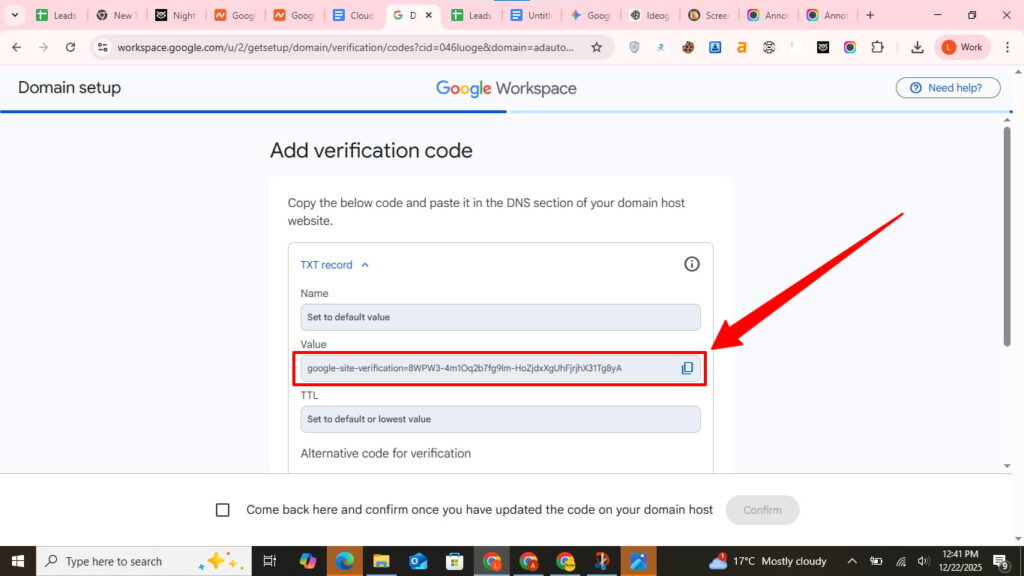
Go to your domain registrar (GoDaddy, Namecheap, etc.). Add this TXT record to your DNS configuration. Type: TXT. Host: @ (or leave blank). Value: paste the code.
Wait 15 minutes to 24 hours for domain verification.
Step 5: After verification, click “Activate Gmail” next to your domain. Add Google’s MX records at your registrar:
Priority 1: ASPMX.L.GOOGLE.COM
Priority 5: ALT1.ASPMX.L.GOOGLE.COM
Priority 5: ALT2.ASPMX.L.GOOGLE.COM
Priority 10: ALT3.ASPMX.L.GOOGLE.COM
Priority 10: ALT4.ASPMX.L.GOOGLE.COM
Done. Users can now receive email at the alias domain. To send from it, they add it in Gmail Settings → Accounts → “Add another email address.”
Adding a Secondary Domain
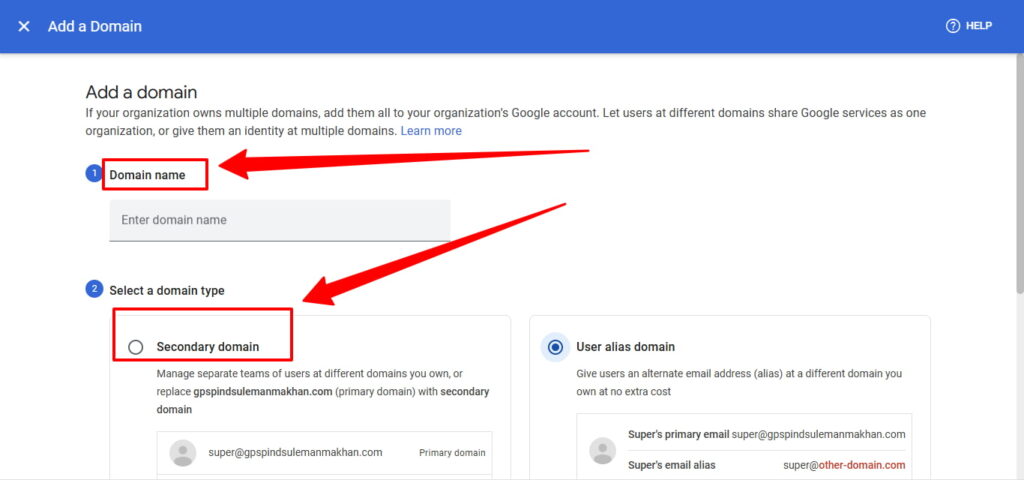
Follow the same steps, but select “Secondary domain” instead of alias in Step 3.
After activation, you’ll create new users: Menu → Users → Add new user. When entering the email, select your secondary domain from the dropdown after the @ symbol.
Each user you create on the secondary domain uses a paid license.
Setting Up Email Authentication (Critical Step)
Here’s what competitors miss: email authentication is mandatory for multiple domains. Without it, your emails land in spam.
SPF Records
Add this TXT record to every domain (primary, alias, secondary):
v=spf1 include:_spf.google.com ~all
At your domain registrar: Type: TXT, Host: @, Value: the above code.
This tells receiving servers that Google can send email from your domain.
DKIM Signing
In admin console: Apps → Google Workspace → Gmail → Authenticate email.
Click “Generate new record” for each domain. You’ll get a TXT record starting with google._domainkey.
Add it to DNS: Host: google._domainkey, Type: TXT, Value: paste the long key.
After 48 hours, click “Start authentication” in the admin console.
DMARC Policy
Add this to each domain:
v=DMARC1; p=quarantine; rua=mailto:dmarc-reports@yourdomain.com
Host: _dmarc, Type: TXT, Value: the above.
This protects your domain and improves email deliverability.
Troubleshooting Common Problems
Most setup issues come down to DNS or timing. Here are quick fixes.
Problem: Domain Verification Fails
Solution: Check that your TXT record is on the root domain (not a subdomain). Use @ or leave Host blank. Remove any trailing periods. Wait the full 24 hours for DNS propagation.
Test with: nslookup -type=TXT yourdomain.com
Problem: Email Not Arriving at Alias Domain
Solution: Verify you clicked “Activate Gmail” after domain verification. Check that MX records point to Google. Send a test email from an external account (not your Google Workspace account).
If delivery fails after 48 hours, your MX records likely aren’t configured correctly.
Problem: Can’t Send From Alias Address
Solution: In Gmail, go to Settings → Accounts → “Add another email address”. Enter your alias address. Critical: Check the “Treat as an alias” box. This skips SMTP verification.
You can then select which address to send from in Gmail’s compose window.
Problem: Users on Secondary Domain Can’t Access Shared Drives
Solution: Shared Drives don’t automatically include secondary domain users. Open the drive, click “Manage members”, and manually add users with their @secondarydomain.com addresses.
Better approach: Create a Google Group containing users from all domains, then share the drive with the group.
Best Practices for Multiple Domains
Use Organizational Units
Create separate organizational units for each domain. This lets you apply different security policies, access controls, and service settings per domain.
Admin console → Organizational units → Create OUs like:
- Primary Domain Team
- Brand A Team
- Brand B Team
Move users into appropriate OUs, then manage settings at the OU level.
Plan Your Domain Strategy
Before adding domains, map out:
- Which team members need which email addresses
- Whether teams overlap or are separate
- Your budget for user licenses
- Future acquisitions or brand changes
This prevents costly mistakes like creating secondary domains when aliases would work.
Test Thoroughly Before Announcing
Set up one test user on each domain. Verify:
- Email delivery works both directions
- Email authentication passes (send to mail-tester.com)
- Shared resources are accessible
- Calendars and Drive function correctly
Only then roll out to your full team.
Frequently Asked Questions
Can I have multiple domains under one Google Workspace account?
Yes. You can manage up to 600 domains in a single Google Workspace account: 1 primary domain, up to 20 alias domains (free), and up to 599 secondary domains (paid per user).
Does adding domains cost extra?
Alias domains are free. Secondary domains require paying for each user account at your plan’s rate. For Business Standard ($12/user/month), each secondary domain user costs $12/month.
What’s the difference between alias and secondary domains?
An alias domain gives existing users additional email addresses at no cost. A secondary domain creates separate user accounts with their own mailboxes and requires paid licenses.
How long does domain setup take?
Domain verification typically takes 15 minutes to 24 hours. The actual configuration takes about 20-30 minutes per domain, including MX records and email authentication setup.
Can I change my primary domain?
Yes, most Google Workspace editions allow changing your primary domain. First add the new domain as a secondary domain, migrate users, then use the “Change primary domain” option in admin console.
Where to Buy Google Workspace: Top Authorized Resellers
You can purchase Google Workspace through authorized resellers, which often provide local support, setup assistance, and flexible billing options for businesses. Buying from a trusted reseller ensures you get professional guidance and additional services alongside your subscription.
Top 5 Google Workspace Resellers:
- Leads Monky ( Enjoy up to 64% off with promo code PARTNER2026 (Redeem Here) – Plus free setup and support)
- Agosto (Save up to 10% off on Google Workspace plans with expert migration support)
- Onix (Get up to 5% off on Google Workspace with enterprise-level deployment and support)
- Cumulus Global (Enjoy up to 20% off Google Workspace plans with certified reseller support)
- GsuiteReseller (USA) (Get up to 10% off on Google Workspace plans with dedicated support)
Ready to Consolidate Your Domains?
Adding multiple domains to Google Workspace simplifies administration while maintaining brand flexibility. Whether you choose alias domains (free) or secondary domains (paid), you’ll centralize management and reduce complexity.
Start with alias domains if the same team manages multiple brands—you’ll save thousands annually. Use secondary domains when you have distinct teams at different domains.
The setup takes 30-60 minutes per domain. The time savings and cost reduction last forever.
Next steps: Log into your admin console, decide alias vs secondary, and follow the step-by-step guide above. Don’t forget email authentication—it’s what keeps your messages out of spam folders.
Need help? Google Workspace support is available 24/7 for all paid accounts.
FAQs
How many custom domains are there with Google Workspace?
You can add up to 600 total domains: 1 primary domain, 20 alias domains (free), and 599 secondary domains (paid per user).
Is it worth having multiple domains?
Yes, if you manage multiple brands or acquired companies—alias domains are free and save thousands compared to separate accounts.
Can you have multiple domains on Google Workspace?
Yes, Google Workspace supports multiple domains in a single account with centralized admin control and billing.
Does Google Workspace charge for secondary domains?
No charge to add secondary domains, but you pay for each user account created on them at your plan’s rate.
Can I have multiple businesses under one Google Account?
Yes, use secondary domains for separate businesses or alias domains if the same team manages multiple brands.
Does Google allow to have two domains on one website?
Google Workspace allows multiple domains for email and services, but website hosting is separate from your Workspace account.
Get Google Workspace at 64% Off
Same service. Better price. Professional setup included.
⭐⭐⭐⭐⭐ 151+ companies trust us
Partner Pricing:
• Business Starter: $3/month (Google: $8)
• Business Standard: $13/month (Google: $17)
• Business Plus: $20/month (Google: $26)
FREE:
Complete DNS setup + 24/7 support + USA IPs
15-user minimum | Setup in 24 hours


