
Google Workspace two factor authentication is no longer optional—it’s essential. If you’re an admin, Google now requires you to enable it. But here’s the good news: setting up two factor authentication Google Workspace takes less than 10 minutes.
Let’s walk through exactly how to protect your business with 2FA (also called 2-Step Verification or 2SV by Google).
Why You Need Two Factor Authentication Right Now
Here’s a sobering stat: accounts with multi-factor authentication are 99% less likely to get hacked, according to CISA.
Think about what’s in your Google Workspace account. Emails. Financial records. Client data. Employee information. If a hacker steals your password, they get all of it.
Two factor authentication adds a second lock. Even if someone guesses your password, they can’t sign in without your phone or security key.For complete protection beyond 2FA, businesses should also implement [Google Workspace security solutions] to safeguard emails, data, and user access at every level.

💡 Need help setting up Google Workspace?
We’re certified Google partners offering 64% off + free professional setup ($2,000 value). Used by 151+ companies.
Get your quote →What Methods Does Google Workspace Support?
You’ve got six options for that second verification step:
1. Passkeys (Newest & Best)
These use your fingerprint or face to verify your identity. They’re 40% faster than passwords and nearly impossible to phish. This is where Google’s headed in 2025.
2. Security Keys
Physical devices like YubiKey or Titan Security Key. You plug them into your computer or tap them on your phone. The most secure option available.
3. Google Prompts
A notification pops up on your phone asking “Trying to log in?” You just tap “Yes.” Simple and effective.
4. Authenticator Apps
Google Authenticator or similar apps generate six-digit codes every 30 seconds. Works offline, which is clutch when traveling.
5. Backup Codes
Print these out and keep them somewhere safe. Lifesavers when you lose your phone.
6. SMS/Phone Calls
Google lets you use these, but experts don’t recommend them. They’re vulnerable to SIM-swapping attacks.
Step-by-Step Setup for Admins
Here’s how to enable two factor authentication for your organization:
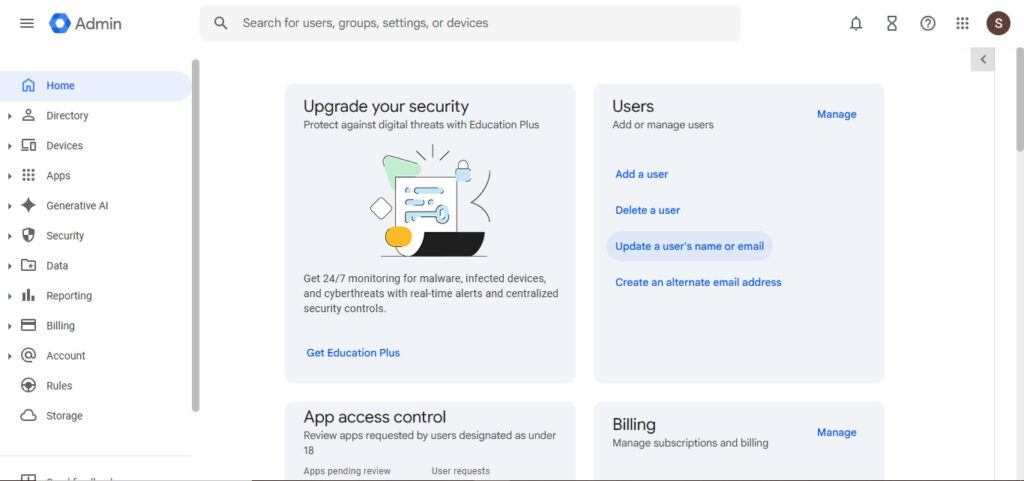
Step 1: Access Your Admin Console
Go to admin.google.com and sign in with your admin account.
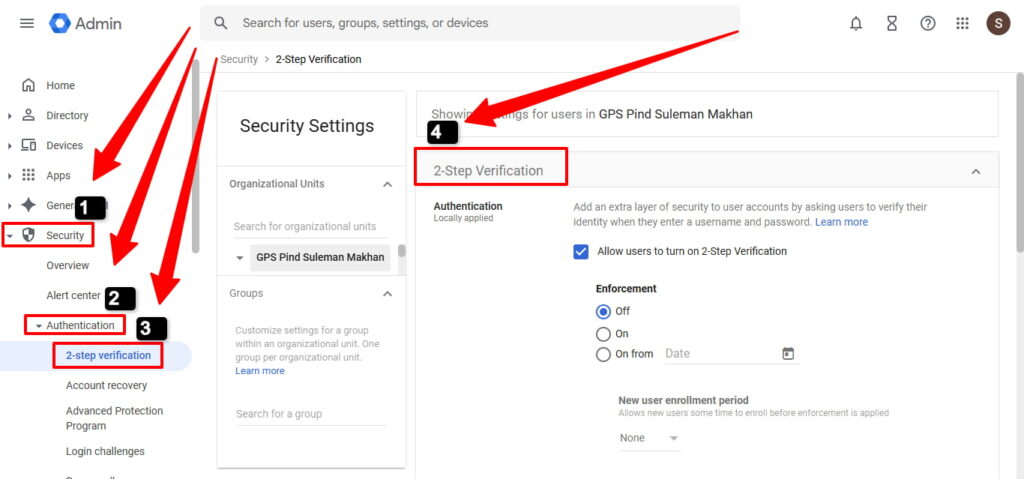
Step 2: Navigate to Security Settings
Click Security > Authentication > 2-step verification.
Step 3: Allow Users to Turn It On
Check “Allow users to turn on 2-Step Verification.” This lets your team set up their preferred method.
Step 4: Decide on Enforcement
You have three choices:
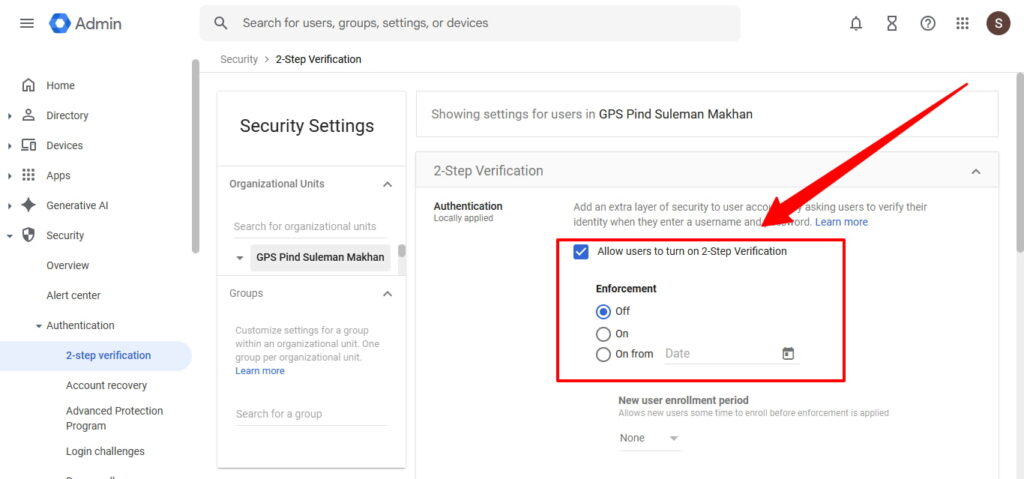
- Off (just allowing it, not requiring it)
- On from [specific date] (gives people time to enroll)
- On now (only if everyone’s already set up)
Pro tip: Give your team at least two weeks’ notice before enforcing 2FA. Nobody likes getting locked out of their account.
Step 5: Choose Allowed Methods
Under “Methods,” select what’s available:
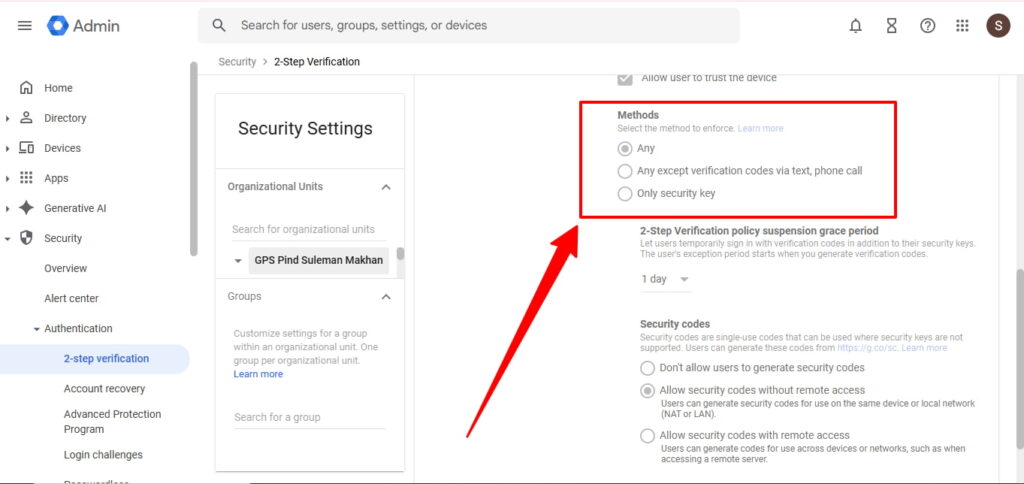
- “Any” (all methods allowed)
- “Any except text/phone” (recommended)
- “Only security keys” (maximum security)
We recommend “Any except text/phone” for most businesses. It blocks the weakest option while keeping things flexible.
Step 6: Set Grace Periods
For new employees, set an enrollment period of 1-2 weeks. This gives them time to configure their authentication method without getting locked out on day one.
Click Save. You’re done.
How Users Enable It (The Employee Side)
Your team members need to activate 2FA on their accounts too:
- Go to myaccount.google.com
- Click Security
- Select 2-Step Verification
- Click “Get Started“
- Follow the prompts to add their phone or security key
The whole process takes about five minutes.
Common Questions Answered
What if someone loses their phone?
That’s why you generate backup codes. Admins can also temporarily disable 2-Step Verification for that user in the admin console.
Can I require passkeys only?
Yes! In 2025, you can restrict to passkeys on security keys only. It’s under Security > Passwordless in the admin console.
What about third-party apps?
They’ll still work. Google Workspace generates app-specific passwords for older applications that don’t support 2FA.
Your Next Steps
Two factor authentication Google Workspace isn’t just about checking a compliance box. It’s about keeping your business secure in 2025 and beyond.
Start with your admin accounts first. Then roll it out to your team with clear communication about why it matters.
You’ll sleep better knowing that even if a password leaks, your data stays safe.
Ready to get started? Head to admin.google.com and enable 2-Step Verification today.
Where to Buy Google Workspace: Top Authorized Resellers
You can purchase Google Workspace through authorized resellers, which often provide local support, setup assistance, and flexible billing options for businesses. Buying from a trusted reseller ensures you get professional guidance and additional services alongside your subscription.
Top 5 Google Workspace Resellers:
- Leads Monky ( Enjoy up to 70% off with promo code GWS12 – Plus free setup and support)
- Agosto (Save up to 10% off on Google Workspace plans with expert migration support)
- Onix (Get up to 5% off on Google Workspace with enterprise-level deployment and support)
- Cumulus Global (Enjoy up to 20% off Google Workspace plans with certified reseller support)
- GsuiteReseller (USA) (Get up to 10% off on Google Workspace plans with dedicated support)
FAQs
What are the disadvantages of using Google Workspace?
The main disadvantages include subscription costs, internet dependency, limited offline functionality, and less customization compared to self-hosted solutions.
Is Google Authenticator part of Google Workspace?
No, Google Authenticator is a free standalone app that works with Google Workspace but isn’t included in the subscription.
How do I set up 2 factor authentication on Google Workspace?
Go to admin.google.com > Security > Authentication > 2-step verification, enable it, then users set up their method at myaccount.google.com.
How do I turn off 2-Step Verification on Google Workspace?
In the admin console, go to Security > Authentication > 2-step verification and set Enforcement to “Off” (not recommended for security).
How do I turn on two-factor authentication on Google?
Visit myaccount.google.com, click Security, select 2-Step Verification, and follow the setup prompts to add your phone or security key.
Does Google Workspace use MFA?
Yes, Google Workspace supports MFA through its 2-Step Verification feature, offering multiple authentication methods including security keys, authenticator apps, and passkeys.
Get Google Workspace at 64% Off
Same service. Better price. Professional setup included.
⭐⭐⭐⭐⭐ 151+ companies trust us
Partner Pricing:
• Business Starter: $3/month (Google: $8)
• Business Standard: $13/month (Google: $17)
• Business Plus: $20/month (Google: $26)
FREE:
Complete DNS setup + 24/7 support + USA IPs
15-user minimum | Setup in 24 hours


