

Here’s the truth: you’re about to make a decision that could either protect your business or destroy your email deliverability forever.
Should you create a new Google Workspace or secondary domain? Or maybe use a subdomain?
Most people get this wrong. And when you mess this up, your primary domain gets blacklisted, your emails land in spam, and suddenly you can’t even email your existing customers.
Let me show you exactly what works in 2026.
The Quick Answer (Save Yourself Hours of Research)
Don’t use Google’s “secondary domain” feature for cold email. Don’t use subdomains either.

Here’s what you need: completely separate domains with their own individual Google Workspace accounts.
I know that sounds confusing. Let’s break it down.
Why Everyone Gets Confused (It’s Not Your Fault)
Google doesn’t help. They call their domain alias feature a “secondary domain.” But that’s NOT what cold email experts mean when they say “use secondary domains.”
Here’s what’s actually different:
Your Primary Domain = Your main business domain (like acmecorp.com). Never use this for cold email campaigns.
A Subdomain = Adding a prefix to your domain (like sales.acmecorp.com). Looks separate, but it’s not. Email service providers still connect it to your root domain.
Google’s Secondary Domain Feature = Adding another domain to your existing Workspace account. Everyone gets automatic email aliases. Still tied to your primary account. Not safe for cold outreach.
Separate Domains (What You Actually Need) = Completely independent domains like getacmecorp.com or tryacmecorp.com. Each has its own Google Workspace account. Total isolation.
Only that last option protects you.
💡 Need help setting up Google Workspace?
We’re certified Google partners offering 64% off + free professional setup ($2,000 value). Used by 151+ companies.
Get your quote →The Subdomain Trap (Don’t Fall For It)
Some people think subdomains are clever. They’re free. Easy to set up. Seems like the perfect solution.
Wrong.
When you send cold emails from outreach.acmecorp.com, email providers like Gmail and Outlook still associate that subdomain with acmecorp.com. If your subdomain gets flagged for spam, your primary domain suffers.
It’s like putting a different name tag on the same person. Everyone still knows who you are.
Email reputation doesn’t work in silos when you use subdomains.
Here’s what happens: you send 10,000 cold emails from sales.acmecorp.com. Half bounce. Some people mark you as spam. Gmail notices. Suddenly, emails from your main domain (admin@acmecorp.com) start landing in spam folders too.
Game over.
Why Google’s Secondary Domain Feature Isn’t the Answer Either
Google Workspace lets you add up to 599 secondary domains to one account. Sounds perfect, right?
Not for cold email.
Here’s how it works: you add tryacmecorp.com as a domain alias. Now John at john@acmecorp.com automatically gets john@tryacmecorp.com. Both addresses go to the same inbox. You manage everything under one admin console.
The problem? They’re still connected. One billing account. One reputation pool. One point of failure.
If you burn one domain with aggressive cold outreach, the whole account suffers. All your domains. All your users. Everything.
That’s not isolation. That’s putting all your eggs in one basket and hoping none of them break.
What Actually Works: Separate Domains (The Right Way)
You need completely independent domains. Here’s the setup:
Primary domain: acmecorp.com (for business communications) Cold email domains: getacmecorp.com, tryacmecorp.com, acmecorphq.com
Each cold email domain gets:
- Its own Google Workspace account
- Its own admin console
- Its own billing
- Complete isolation from everything else
If getacmecorp.com gets blacklisted? Zero impact on acmecorp.com. Zero impact on tryacmecorp.com.
That’s real protection.
How Many Domains Do You Actually Need?
Here’s the math everyone skips.
You can safely send about 40-50 emails per day from each email account (after proper warmup). Create 3 accounts per domain for maximum safety.
So one domain = roughly 120-150 emails per day.
Want to send 10,000 cold emails per month?
10,000 ÷ 30 days = 333 emails per day 333 ÷ 120 emails per domain = 2.8 domains
But wait. You also need to account for email warmup messages (those count toward your daily limit). Add 40% buffer.
You actually need 4-5 domains for 10,000 monthly emails.
Here’s a quick reference:
- 1,000 emails/month = 1 domain
- 5,000 emails/month = 2-3 domains
- 10,000 emails/month = 4-5 domains
- 20,000 emails/month = 8-10 domains
Scale accordingly.
Domain Naming Strategy (This Matters More Than You Think)
Your secondary domains need to look legitimate. Not sketchy.
If your primary domain is acmecorp.com, use patterns like:
- getacmecorp.com
- tryacmecorp.com
- acmecorphq.com
- acmecorpapp.com
- useacmecorp.com
Keep your brand name intact. Add common prefixes that people recognize.
Never do this:
- acme-corp-sales-2024.com (looks spammy)
- buyacme.xyz (terrible extension)
- acmecorp123.com (screams “burner account”)
Stick with .com domains when possible. They have the best deliverability. If .com isn’t available, .io and .tech work okay. But avoid .xyz, .top, .work, .click—these extensions are spam magnets.
The Complete Setup Process (Step-by-Step)
Let’s walk through this. Don’t skip steps.
Step 1: Buy Your Domains
Get them from different registrars. Don’t buy all 10 domains from one company.
Good options:
- Cloudflare Registrar ($10/year)
- Porkbun ($11/year, though some users report deliverability issues lately)
- Namecheap ($11-17/year)
Spread your purchases across 2-3 providers.
Step 2: Create Separate Google Workspace Accounts
One Google Workspace account per domain. Don’t manage multiple domains under one admin console.
Go to workspace.google.com. Sign up for Business Starter (6$+ Tex= $8.40/user/month). Use your new domain during signup. Alternatively, you can get the same Business Starter plan at 64% lower cost — just $2.99/user/month — with complete free setup, through Leads Monky, an official Google Workspace reseller partner.
Step 3: Verify Domain Ownership
Google gives you a TXT record. Add it to your domain’s DNS settings. Click verify. Wait up to 48 hours.
Step 4: Set Up Email Authentication (Critical)
This is where most people mess up. You need three DNS records:
SPF Record (tells servers you’re authorized):
- Type: TXT
- Name: @
- Value: v=spf1 include:_spf.google.com ~all
DKIM Record (prevents spoofing):
- Get your DKIM key from Google Workspace Admin Console
- Add as TXT record in DNS
- Enable authentication in Google
DMARC Record (combines SPF and DKIM):
- Type: TXT
- Name: _dmarc
- Value: v=DMARC1; p=none; rua=mailto:admin@yourdomain.com
Skip any of these? Your emails go straight to spam.
Step 5: Configure Domain Forwarding
Forward your cold email domains to your main website. When prospects check getacmecorp.com, they should land on acmecorp.com.
This builds trust. Nobody wants to see a parked domain page.
Step 6: Create Email Accounts
Make 3-5 accounts per domain. Use real names, not generic roles.
Good: john@getacmecorp.com, sarah@getacmecorp.com Bad: sales@getacmecorp.com, info@getacmecorp.com
Add profile pictures. Create professional signatures. Make them look human.
Step 7: Warm Up Your Accounts (Don’t Skip This)
Brand new email accounts have zero reputation. You can’t just start blasting cold emails.
Use email warmup tools like Instantly, Lemwarm, or Mailforge. They automatically send and receive emails to build your sender reputation.
Week 1: 5-10 emails/day Week 2: 15-20 emails/day Week 3: 25-35 emails/day Week 4+: Full capacity (40-50 emails/day)
Rush this process? Hello, spam folder.
Total DIY time per domain: 3-5 hours Total DIY cost: $8.40/user/month + domain ($10-17/year) + warmup tool ($20-30/month)
Path 2: Done-For-You Setup (Skip All the Technical Headaches)
Here’s what most smart teams don’t know: authorized Google Workspace resellers can set everything up for you at a fraction of Google’s direct pricing.
What You Get with Professional Setup:
Services like Leads Monky (a certified Google Cloud Partner) handle everything:
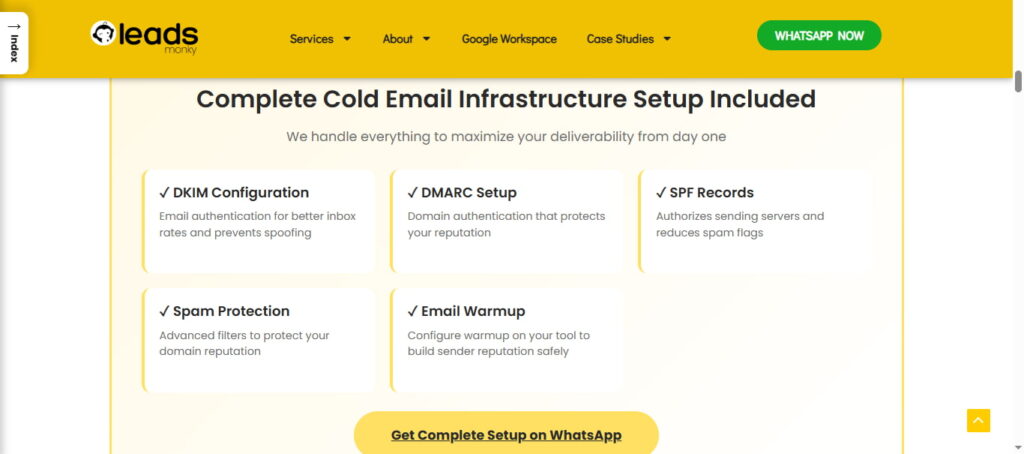
✅ Domain verification – Done for you (no DNS confusion)
✅ SPF, DKIM, DMARC setup – Configured correctly the first time
✅ MX records – Properly set and tested
✅ Domain forwarding – Automatically redirects to your main site
✅ Professional email accounts – Profile pictures, signatures, the works
✅ US-based IP addresses – Better deliverability than foreign IPs
✅ Zero setup fees – All technical work included free
The Pricing Difference:
Google Direct: $8.40/user/month Authorized Reseller: $2.99/user/month
That’s 64% less. Same exact Google Workspace service. Same features. Same security. Just way cheaper through Google’s partner program.
Why This Works:
Google allows certified partners to offer wholesale pricing. You get the identical product—it’s still Google’s infrastructure, Google’s servers, Google’s security. You maintain 100% account ownership.
The reseller just handles the boring technical stuff you’d otherwise spend hours figuring out.
Total professional setup time: 24 hours (hands-off) Total cost: $2.99/user/month + no setup fees
The Biggest Mistakes (And How to Avoid Them)
Mistake #1: Using subdomains instead of separate domains. We covered this. Don’t do it.
Mistake #2: Sending cold emails before proper warmup. Your new domain needs time to build trust with email service providers.
Mistake #3: Buying all domains from one registrar. If that registrar’s domains get flagged industry-wide, you’re toast. Diversify.
Mistake #4: Managing multiple domains under one Google Workspace admin. For cold email, isolation is everything. One admin per domain.
Mistake #5: Forgetting domain forwarding. Prospects will check your domain. A parked page screams “sketchy.”
Mistake #6: Exceeding safe sending limits. Stick to 40-50 total emails per day per account, including warmup emails.
Done-For-You Solutions (If You Value Your Time)
Setting up multiple domains and email accounts manually is tedious. Several platforms handle everything:
Instantly.ai offers pre-configured Google Workspace accounts for about $15/year per domain. They handle DNS configuration, warmup, and provide unified inbox management.
Mailforge provides distributed email infrastructure designed specifically for cold outreach. Around $3-4/month per mailbox.
Smartreach offers secondary domains at $4/month and mailboxes at $3/month—cheaper than Google for high-volume operations.
Use these when:
- You need 10+ domains quickly
- You’d rather focus on strategy than technical setup
- You want pre-warmed accounts to start immediately
Your time might be worth more than the DIY savings.
The Bottom Line (What You Should Actually Do)
Don’t use subdomains for cold email. Don’t use Google’s secondary domain feature either.
Buy completely separate domains that look similar to your primary domain. Create independent Google Workspace accounts for each one. Set up proper DNS records (SPF, DKIM, DMARC). Warm them up properly.
This protects your primary domain, lets you scale cold outreach safely, and keeps your business communications clean.
The setup takes time upfront. But it’s worth it when your 10,000th cold email lands in the inbox instead of spam—and your main domain reputation stays pristine.
Your choice is simple: spend a few hours setting this up correctly, or spend months trying to fix a blacklisted primary domain.
I know which one I’d pick.
Quick Recap:
- Primary domain = sacred, never use for cold email campaigns
- Subdomains = false security, still connected to root domain
- Google’s secondary domain = designed for brand management, not cold outreach
- Separate domains = complete isolation, the only safe choice
- Proper setup = domain purchase + Google Workspace + DNS configuration + email warmup
- Safe limits = 40-50 emails/day per account after 2-4 week warmup
Now go protect your email deliverability. Your future self will thank you.
FAQs
What is the best domain for cold emails?
Completely separate domains from your primary business domain with independent Google Workspace accounts.
What is a secondary domain for cold email?
A domain added to your existing Google Workspace account, not safe for cold outreach due to shared reputation.
Can I add a second domain to my Google Workspace email?
Yes, but using it for cold emails risks your primary domain’s deliverability.
Is Gmail good for cold email?
Gmail works, but only with separate domains and proper warmup; never use your main account.
What is the 30/30/50 rule for cold emails?
Send up to 40–50 emails/day per account after proper warmup; roughly 3 accounts per domain for scaling safely.
Why is Google shutting down Gmail?
It’s not; Gmail continues as part of Google Workspace with evolving features.
Is GoDaddy or Google domains better?
Either works, but diversify registrars for cold email domains to avoid large-scale blacklisting.
What are the 4 types of domains?
Primary domain, subdomain, secondary domain (alias), and completely separate domains.
Get Google Workspace at 64% Off
Same service. Better price. Professional setup included.
⭐⭐⭐⭐⭐ 151+ companies trust us
Partner Pricing:
• Business Starter: $3/month (Google: $8)
• Business Standard: $13/month (Google: $17)
• Business Plus: $20/month (Google: $26)
FREE:
Complete DNS setup + 24/7 support + USA IPs
15-user minimum | Setup in 24 hours


