
Rebranding your company? Got a better domain name? You’re probably wondering if you can change your primary domain in Google Workspace without breaking everything.
Good news: you can. But here’s the thing—it’s not a simple checkbox.
This guide shows you exactly how to change Google workspace primary domain safely. We’ll cover what actually happens to your data, common mistakes to avoid, and the exact steps you need to follow.
Let’s dive in.
What Is Your Primary Domain in Google Workspace?
Your primary domain is your company’s digital address in Google Workspace.

It’s the domain you used when signing up. Everything connects to it—email addresses, Drive sharing links, Meet URLs, and calendar invites.
Think of it like your business headquarters. Understanding how to manage multiple domains in Google Workspace will help you decide whether changing your primary domain is the right move. Moving it requires planning.
Before You Change: Critical Things to Know
Here’s what most guides don’t tell you: changing your Google Workspace primary domain isn’t always necessary.
Many businesses actually need a domain alias, not a full domain swap. What’s the difference?
Domain alias: Your team gets email at both old and new domains. Users still log in with the old domain. Takes 15 minutes. Zero risk.
Primary domain change: Complete migration. New login credentials. Requires updating every user account. Takes 4-6 hours minimum.
Learn more about the differences between alias and secondary domains in our complete multiple domains guide. For basic navigation, check our Google Workspace Admin Console guide.
💡 Need help setting up Google Workspace?
We’re certified Google partners offering 64% off + free professional setup ($2,000 value). Used by 151+ companies.
Get your quote →Still need to switch? Make sure you’re eligible first.
You can’t change if:
- You purchased your domain through Google during signup
- You’re in a free trial (cancel and restart instead)
- Your domain isn’t verified
- You have G Suite legacy edition
Step-by-Step: Change Your Primary Domain for Google Workspace
Ready to make the switch? Here’s the exact process.
Step 1: Prepare Your New Domain
First, you need ownership and access.
Purchase your new domain from any registrar. Get login credentials for DNS settings—you’ll need them soon.
Contact your reseller if you bought through one. They’ll need to know about your domain migration.
Pro tip: Create a communication plan for your team now. They’ll need new login info.
Step 2: Add Your New Domain as Secondary
This is crucial: don’t add it as an alias.
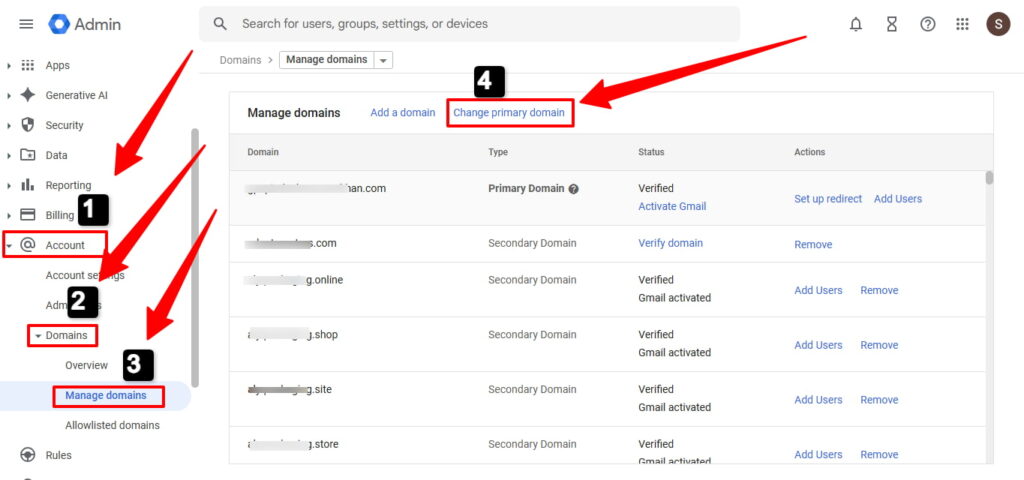
Log into admin.google.com. Go to Account > Domains > Manage domains.
Click “Add a domain”
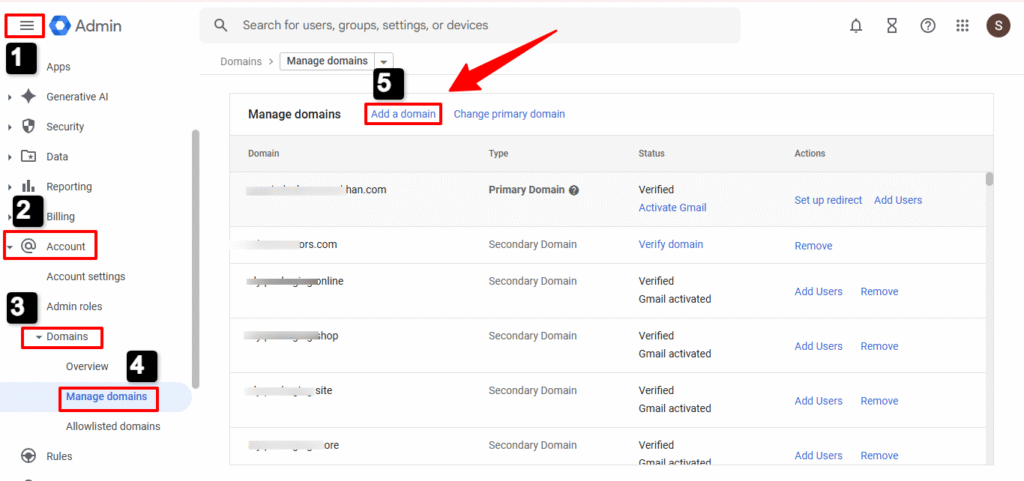
and select “Secondary domain” (not alias).
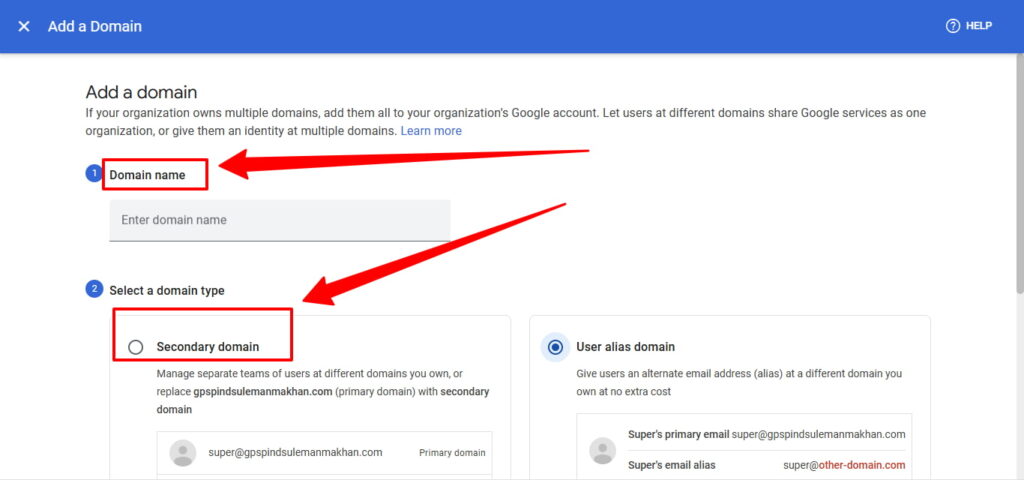
Enter your new domain name. Click “Add domain & start verification.”
Follow the verification steps. You’ll add a TXT record to your DNS settings at your registrar.
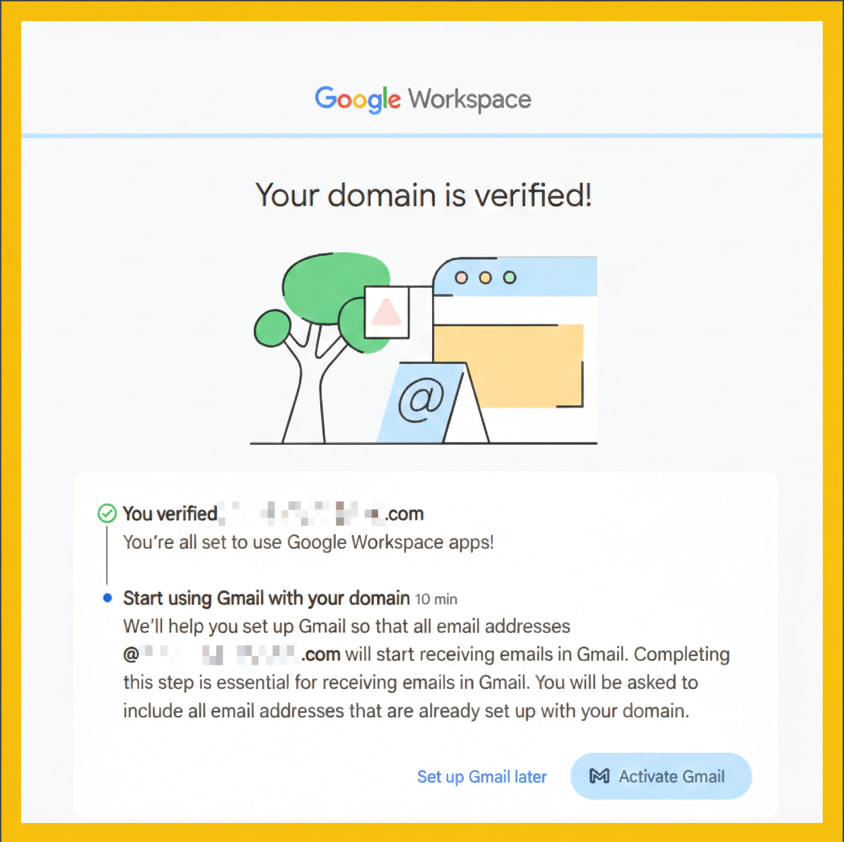
Wait 24 hours if you previously had this domain as an alias.
Step 3: Configure Email Settings
Now set up email for your new domain.
Add MX records at your domain registrar pointing to Google’s mail servers. This won’t affect current email—it’s just preparation.
Set up SPF records: v=spf1 include:_spf.google.com ~all
Configure DKIM in Admin Console under Apps > Google Workspace> Gmail > Authenticate email.
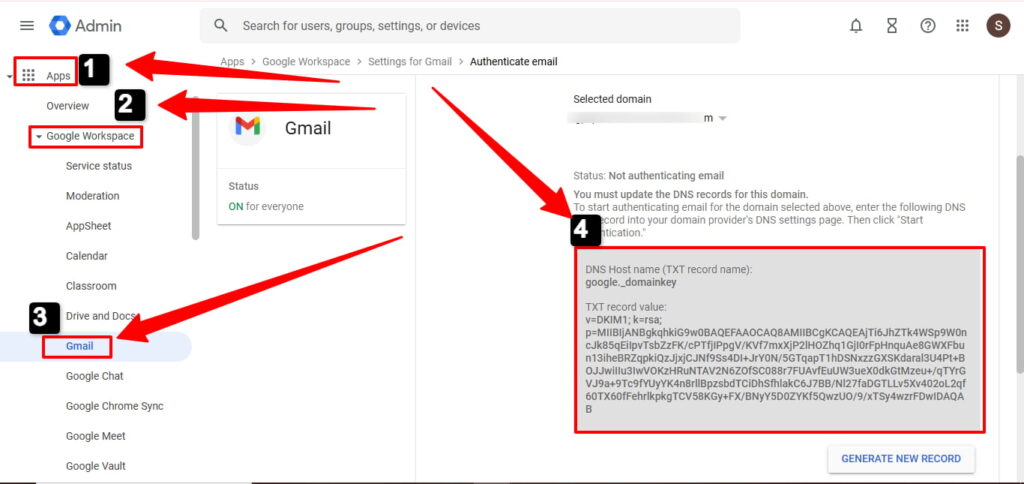
Why this matters: Without proper email authentication, your messages go straight to spam.
Step 4: Switch to New Primary Domain
Time for the actual switch.
In Admin Console, go to Domains > Manage domains. Click “Change primary domain.”
Select your new domain from the dropdown. Click “Change Primary Domain.”
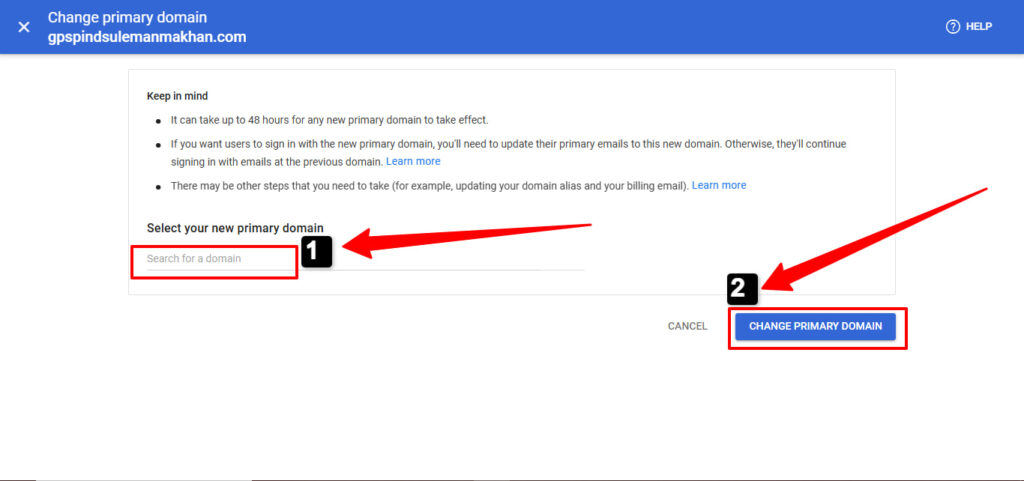
Confirmation can take up to 48 hours. Usually it’s much faster.
Step 5: Update All User Accounts
This is the tedious part—but necessary.
For small teams (under 20 users): Go to Directory > Users. Click each user’s name. Hit “Update User.” Change their primary email to the new domain.
For larger teams: Export users to CSV. Update email addresses in the spreadsheet. Use bulk update to import.
Important: When you update your own admin account, you’ll get logged out immediately. Sign back in with your new email address.
Step 6: Update Groups and Settings
Don’t forget mailing groups.
Go to Directory > Groups. Update each group’s email to the new domain.
Convert your old domain to a domain alias so you still receive email there. This prevents lost messages during transition.
What Happens to Your Data?
Here’s what people really want to know: will I lose my Gmail, Drive files, or calendar?
Your data stays safe:
- ✓ All Gmail messages remain intact
- ✓ Drive files and folders untouched
- ✓ Primary calendar events preserved
- ✓ Contacts stay the same
What gets reset:
- ✗ Email signatures (Gmail deletes them automatically)
- ✗ Email filters and labels
- ✗ Secondary calendars you created
Third-party apps like Slack, Asana, or Salesforce will disconnect. You’ll need to reconnect them with new credentials.
Should You Really Change Your Primary Domain?
Be honest: do you actually need a full primary domain change?
If you just want new email addresses, use a domain alias instead. It’s faster, safer, and gets you 90% of what you need.
Change your primary domain only if:
- You’re losing ownership of the old domain
- You use Google App Engine (requires primary domain login)
- You’re consolidating multiple business entities
Otherwise, adding a domain alias saves you hours of work and eliminates migration risks.
Ready to Make the Switch?
Changing your primary domain in Google Workspace requires careful planning. But with these steps, you’ll avoid the common pitfalls that trip up most admins.
Remember: prepare thoroughly, communicate with your team, and keep your old domain as an alias for at least 3-6 months.
Need help with a complex migration? Consider hiring a Google Cloud Partner. The peace of mind is worth it.
Where to Buy Google Workspace: Top Authorized Resellers
You can purchase Google Workspace through authorized resellers, which often provide local support, setup assistance, and flexible billing options for businesses. Buying from a trusted reseller ensures you get professional guidance and additional services alongside your subscription.
Top 5 Google Workspace Resellers:
- Leads Monky ( Enjoy up to 64% off with promo codePARTNER2026 (Redeem Here) – Plus free setup and support)
- Agosto (Save up to 10% off on Google Workspace plans with expert migration support)
- Onix (Get up to 5% off on Google Workspace with enterprise-level deployment and support)
- Cumulus Global (Enjoy up to 20% off Google Workspace plans with certified reseller support)
- GsuiteReseller (USA) (Get up to 10% off on Google Workspace plans with dedicated support)
FAQs
How do I change my primary address?
Go to Admin Console > Account > Domains > Manage domains, click “Change primary domain,” select your new verified secondary domain, and confirm the change.
How do I change my primary on Google?
In Google Workspace Admin Console, navigate to Domains > Manage domains > “Change primary domain” button, then select your verified secondary domain from the dropdown.
How do I remove the primary domain from Google Workspace?
You cannot remove your primary domain—you must first change to a different primary domain, then you can remove the old one as a secondary domain.
How do I change the primary admin in Google Workspace?
Go to Admin Console > Directory > Users, assign Super Admin role to the new admin, then remove Super Admin privileges from the old admin account.
How do I transfer Google Workspace to a new domain?
Add your new domain as secondary, verify it, set up MX records, change it to primary domain, then migrate all user accounts to the new domain.
How do I change my primary address in my Google account?
For personal Gmail accounts, go to myaccount.google.com > Personal info > Email, but you cannot change @gmail.com addresses—create a new account instead.
Can you change your primary domain in Google Workspace?
Yes, by adding a verified secondary domain and using the Admin Console to make it primary.
How do I change a primary domain?
Go to Admin Console > Account > Domains > Manage domains > Change primary domain, then select your new domain.
How do I change my primary contact in Google Workspace?
Assign the Super Admin role to the new contact in Directory > Users, then remove it from the old contact.
Can I change my domain name with Google?
Yes, by changing your primary domain in Google Workspace Admin Console, after verifying ownership of the new domain.
What is my primary domain?
It’s the main domain used for login, email addresses, Drive sharing, and all Workspace services.
Can I use my own domain with Google Workspace?
Yes, you can add and verify your custom domain during setup or later in Admin Console.
How to change the primary DNS?
Update DNS records at your domain registrar; primary domain changes require MX, SPF, and DKIM updates for email.
How to manage a domain in Google Workspace?
Use Admin Console > Account > Domains to add, verify, set primary, or configure aliases for domains.
Get Google Workspace at 64% Off
Same service. Better price. Professional setup included.
⭐⭐⭐⭐⭐ 151+ companies trust us
Partner Pricing:
• Business Starter: $3/month (Google: $8)
• Business Standard: $13/month (Google: $17)
• Business Plus: $20/month (Google: $26)
FREE:
Complete DNS setup + 24/7 support + USA IPs
15-user minimum | Setup in 24 hours


