Quick Answer
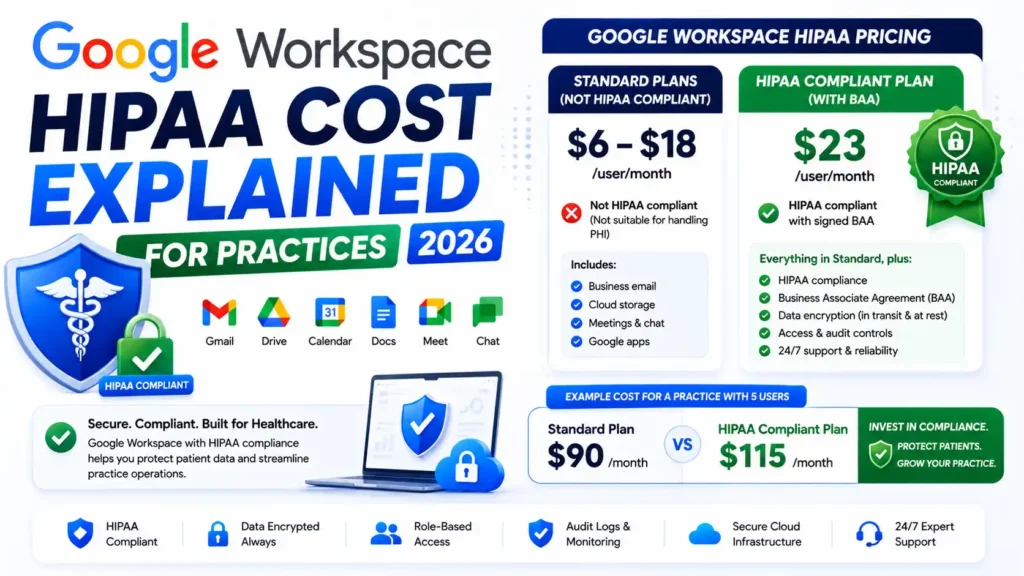
Google Workspace HIPAA cost depends on which plan you choose — not on Google charging extra for compliance. The Business Associate Agreement is completely free with every paid Business or Enterprise plan. Official Google Workspace pricing for HIPAA-eligible plans starts at $8/user/month for Business Starter and reaches $28/user/month for Business Plus. Most healthcare practices need Business Plus because it includes Google Vault, advanced endpoint management, and the audit controls compliance reviewers expect. A 10-person clinic should budget between $3,000 and $6,000 for the first year when licenses, workforce training, and annual risk assessment are all factored in.
Google Workspace HIPAA cost depends on which plan you choose, not on Google charging extra for compliance. The Business Associate Agreement is free with every paid Business or Enterprise plan. Official Google Workspace pricing for HIPAA-eligible plans starts at $8/user/month for Business Starter and $28/user/month for Business Plus on annual billing. The license fee is only part of the full picture. Workforce training, annual risk assessments, third-party vendor agreements, and correct Workspace configuration all factor into your true annual budget. This guide covers every plan tier, the real cost breakdown, which Google Workspace plan is HIPAA compliant in practice, and the hidden fees most clinics discover only after signing up.
What Does Google Workspace HIPAA Compliance Actually Require?

HIPAA compliance in Google Workspace requires three things — and missing any one means your organization is not compliant, regardless of what you pay each month.
First, you need a paid Business or Enterprise plan. Free Google accounts are not eligible for the BAA and cannot be used to handle Protected Health Information.
Second, you need a signed Business Associate Agreement with Google. This is a legally binding document establishing Google’s responsibilities for protecting PHI on your behalf. It is available at no cost through the Admin Console.
Third, you need correct configuration of your Workspace settings. A signed BAA does not make your environment compliant by itself. External sharing permissions, device management policies, non-covered service access, and data retention rules all require deliberate setup.
Google Workspace provides the infrastructure for HIPAA compliance. Whether your specific implementation is compliant depends entirely on how your organization configures and uses those tools.
Google Workspace HIPAA Cost: Plan-by-Plan Pricing Breakdown 2026
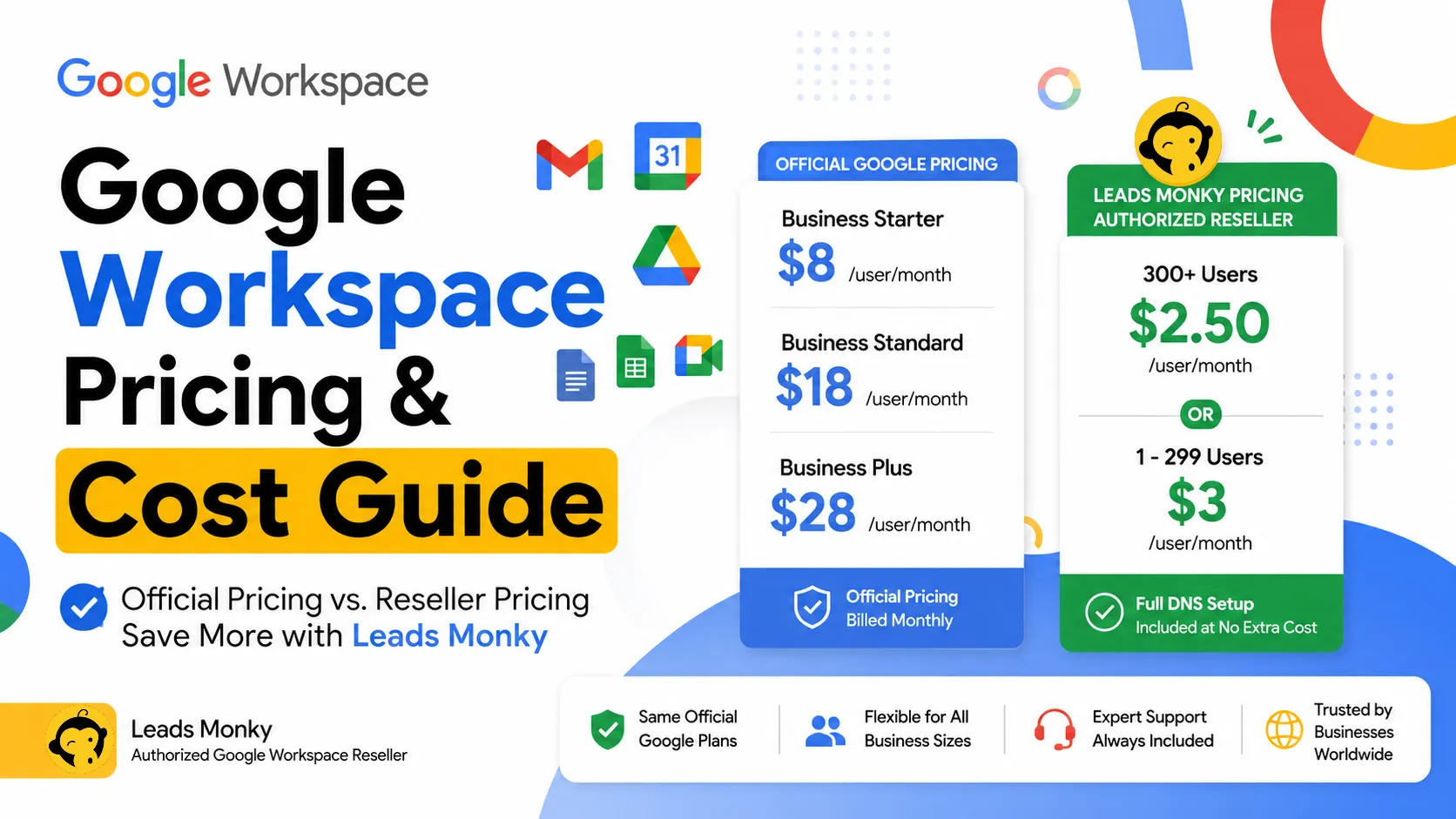
All four paid tiers are eligible for the BAA. Here are current official Google prices alongside Leads Monky reseller pricing for each HIPAA-eligible plan.
| Plan | Official Google Price | Leads Monky Price | Monthly Saving | Yearly Saving |
|---|---|---|---|---|
| Starter, below 300 users | $8/user/month | $3/user/month | Save $5/user/month | Save $60/user/year |
| Starter, 300+ users | $8/user/month | $2.50/user/month | Save $5.50/user/month | Save $66/user/year |
| Business Standard | $18/user/month | $13/user/month | Save $5/user/month | Save $60/user/year |
| Business Plus | $28/user/month | $20/user/month | Save $8/user/month | Save $96/user/year |
No hidden charges. No extra taxes. The price you see is the price you pay.
Annual billing saves approximately 17% compared to monthly billing. For a 10-person clinic on Business Plus, choosing annual over monthly saves an additional $672 per year through Leads Monky pricing before any other cost reduction.
💡 Need help setting up Google Workspace?
We’re certified Google partners offering 64% off + free professional setup ($2,000 value). Used by 1000+ companies.
Get your quote →Which Google Workspace Plan Is Actually HIPAA Compliant?
This is where most guides fail healthcare organizations. They confirm all paid plans are BAA-eligible and stop there. That answer is technically accurate but operationally incomplete.
Business Starter
You can sign the BAA on Business Starter. But the plan lacks advanced endpoint management, enhanced audit logs, and eDiscovery capabilities. For a solo practitioner with minimal PHI exposure, Starter may be workable. For any multi-person practice managing patient records across a team, the missing controls create compliance risk that most auditors will flag.
Business Standard
Business Standard adds 2 TB storage and improved Meet features but still falls short on the mobile device management depth and audit controls that compliance reviewers look for. It is a step up from Starter but not a sufficient HIPAA compliance foundation for most practices.
Business Plus
Business Plus is the recommended minimum for most healthcare organizations asking which Google Workspace plan is HIPAA compliant in practice. It includes Google Vault for eDiscovery and retention policies, advanced endpoint management for mobile and desktop devices, enhanced audit controls, and 500-participant Google Meet. Most compliance consultants treat Business Plus as the appropriate starting tier for any practice that regularly handles PHI across a team.
Enterprise
Enterprise is required when your organization needs advanced Data Loss Prevention, context-aware access policies, S/MIME email encryption, or manages more than 300 users. Large hospital systems, multi-location practices, and organizations subject to regulatory requirements beyond standard HIPAA should evaluate Enterprise as their baseline.
Is the Google Workspace HIPAA BAA Free?
Yes. The Business Associate Agreement costs nothing extra. It is available to any paid Google Workspace customer through the Admin Console at no additional charge.
How to sign the Google Workspace HIPAA Business Associate Amendment:
Log into admin.google.com as a Super Administrator. Navigate to Account Settings, then Legal and Compliance. Locate the Google Workspace HIPAA Business Associate Amendment. Click Review and Accept. Confirm your organization’s status as a Covered Entity or Business Associate. Click Accept — the agreement is legally binding from this point. Screenshot the confirmation page and file it with your compliance records.
The signing process takes under 10 minutes. The preparation work — configuring your Workspace environment correctly before PHI enters the system — takes considerably longer and is where most compliance gaps actually occur.
Which Google Services Are Covered Under the HIPAA BAA?
This is the most dangerous knowledge gap in Google Workspace HIPAA setups. Not every tool included in your subscription is covered. Staff can inadvertently use PHI through a non-covered service without realizing the compliance exposure it creates.
Services covered under the BAA with PHI permitted when properly configured: Gmail, Google Drive, Google Calendar, Google Meet, Google Chat, Google Vault, Google Docs, Google Sheets, Google Slides, Gemini for Google Workspace used within managed apps through your organizational domain, Google Tasks, Google Keep, Google Voice, and Google Sites.
Services never covered — do not use for PHI under any circumstances: Google Photos, YouTube, Blogger, the standalone consumer Gemini app at gemini.google.com, and third-party Marketplace add-ons without their own separate BAA.
The Marketplace point creates compliance risk that organizations consistently overlook. Every CRM, EHR integration, appointment scheduling plugin, or other third-party tool installed through the Google Workspace Marketplace requires its own separate Business Associate Agreement. Google’s BAA does not extend to those vendors.
The Real Google Workspace HIPAA Compliance Cost: Hidden Fees
The per-user license is only your starting point. Here is what the full annual budget looks like for a 10-person clinic on Business Plus through Leads Monky reseller pricing.
| Cost Item | Estimated Annual Cost |
|---|---|
| Workspace licenses — 10 users, Business Plus (Leads Monky) | $2,400 |
| HIPAA workforce training | $300 to $1,500 |
| Annual risk assessment | $500 to $3,000 |
| Third-party vendor BAAs (CRM, EHR, scheduling) | $0 to $1,000 |
| IT setup or compliance consultant (one-time) | $0 to $2,500 |
| Total realistic first-year cost | $3,200 to $10,400 |
The hidden cost most practices miss is shared inbox licensing. Info@, support@, and billing@ addresses each require a paid user license unless email aliases are configured. A 10-person practice with four shared inboxes is paying for 14 users, not 10. Email aliases route messages to a main inbox at no additional cost and are available on every paid plan. Configure them before purchasing and eliminate this cost entirely.
Gemini AI and HIPAA: What Healthcare Teams Need to Know in 2026
Google integrated Gemini AI across all Workspace plans, which created a compliance consideration that most HIPAA guides have not yet addressed properly.
Gemini used within Workspace apps — drafting emails in Gmail, summarizing documents in Docs, generating meeting notes in Meet — through your managed organizational domain is covered under the BAA.
The consumer Gemini app at gemini.google.com is a completely separate product and is not covered under any Google Workspace BAA. If a staff member copies patient notes, appointment details, or any PHI into the consumer Gemini app even once, that constitutes a HIPAA violation. A valid BAA for your Workspace environment does not change this.
The fix is disabling access to consumer Google services for any users who handle PHI through organizational unit settings in the Admin Console. It takes minutes to configure and eliminates a significant compliance exposure.
One additional update for 2026: the updated 42 CFR Part 2 rules covering substance use disorder records came into effect in early 2026. If your practice handles SUD records, your Workspace configuration needs to account for stricter redisclosure requirements beyond standard HIPAA.
Google Workspace vs Microsoft 365 for HIPAA: Which Costs Less?
Both platforms support HIPAA compliance with a free BAA. The cost comparison depends on whether AI features are factored in.
| Factor | Google Workspace Business Plus | Microsoft 365 Business Premium |
|---|---|---|
| Price per user per month (direct) | $28.00 | ~$26.00 |
| Leads Monky reseller price | $20.00 | Not applicable |
| BAA available | Yes, free | Yes, free |
| AI included | Gemini, BAA-covered | Copilot costs extra per user |
| eDiscovery | Google Vault included | Microsoft Purview included |
| Best for | Google-native teams | Heavy Excel and Office users |
For a 10-person practice, choosing Google Workspace Business Plus through Leads Monky at $20/user/month versus a comparable Microsoft 365 configuration with Copilot AI represents meaningful annual savings on both licensing and AI access.
The honest caveat: if your team’s workflows are built around desktop Excel, complex Word templates, or SharePoint-based systems, the productivity cost of migrating to Google Workspace is real and should be factored into the comparison alongside licensing costs.
How to Reduce Your Google Workspace HIPAA Cost
HIPAA compliance does not require paying Google’s full retail price. Authorized resellers offer the same Business Plus plan — same Vault, same endpoint management, same audit controls, same BAA eligibility — at lower per-user rates.
Leads Monky is a certified Google Workspace authorized reseller offering Business Plus at $20/user/month versus Google’s direct price of $28/user/month — saving $8 per user per month or $96 per user per year. For a 10-person clinic that is $960 in annual license savings alone.
Beyond pricing, Leads Monky’s setup includes complete DNS configuration — SPF, DKIM, and DMARC records — at no extra charge. Misconfigured DNS records are one of the most common reasons healthcare organizations fail their first compliance review. Leads Monky is trusted by 1,000+ companies for reliable Google Workspace solutions across the USA, UK, Pakistan, India, and UAE. Visit leadsmonky.com/google-workspace for current pricing specific to your team size.
HIPAA Compliance Checklist Before Going Live on Google Workspace
Work through every item on this list before PHI enters your Google Workspace environment for the first time.
Select Business Plus or Enterprise as your plan tier. Sign the BAA through Admin Console, Account Settings, Legal and Compliance. Enable two-factor authentication for all users without exception. Restrict external Drive sharing settings to prevent unauthorized data exposure. Disable non-BAA services including Photos, YouTube, Blogger, and consumer Gemini for all staff who handle PHI. Configure Data Loss Prevention rules at the appropriate plan tier. Set up Google Vault with retention policies and legal hold configurations. Obtain separate BAAs from every third-party Marketplace application your practice uses. Complete HIPAA workforce training for all staff before they begin using the system. Document and archive your risk assessment with a current date.
Common Mistakes Healthcare Organizations Make With Google Workspace HIPAA Setup
Signing the BAA and assuming the work is done. The BAA establishes Google’s obligations. It does not configure your sharing settings, enable Vault retention, or restrict consumer app access. Configuration is your responsibility, not Google’s.
Running Business Starter for a multi-person practice. Starter is BAA-eligible but lacks the endpoint management and audit controls most compliance reviewers expect. The difference between Starter and Plus at Leads Monky pricing is $17 per user per month — small compared to the cost of a compliance audit failure or a reportable breach.
Forgetting Marketplace app BAAs. Every third-party integration needs its own BAA. Google’s agreement does not cover them. This gap is discovered most often during compliance reviews, not before.
Leaving the consumer Gemini app accessible. Staff who handle PHI should not have access to gemini.google.com through their work accounts. Disabling it via Admin Console takes five minutes and eliminates a significant compliance exposure.
Not using email aliases for shared inboxes. Paying for separate licenses for info@, support@, and billing@ addresses is unnecessary. Email aliases handle this at no cost and reduce your monthly user count immediately.
Conclusion
Google Workspace HIPAA cost is straightforward at the official level: the BAA is free, Business Plus is the recommended plan for most healthcare practices, and a 10-person clinic should budget $3,000 to $6,000 per year all-in covering licenses, training, and compliance tooling.
The complexity is in the configuration. A signed BAA with incorrect Workspace settings is not compliance. Consumer app access, unaddressed Marketplace vendor agreements, and missing Vault policies are the gaps that create real exposure — and none are covered by simply paying your monthly license fee.
For practices that want correct setup from day one, Leads Monky handles complete Google Workspace configuration including DNS authentication, Admin Console setup, and 24/7 ongoing support. Business Plus is available at $20/user/month — saving $8 per user per month versus Google’s direct price. Visit leadsmonky.com/google-workspace for pricing and setup details specific to your clinic size.
Frequently Asked Questions
Does Google charge extra for HIPAA compliance?
No. The Business Associate Agreement is completely free for any paid Business or Enterprise Google Workspace customer. Your only cost is the standard per-user license fee for the plan you choose.
Which Google Workspace plan is HIPAA compliant?
All paid plans allow BAA signing, but Business Plus at $28/user/month from Google — or $20/user/month through Leads Monky — is the recommended minimum for most healthcare practices. It includes Google Vault, advanced endpoint management, and enhanced audit controls that compliance reviewers expect.
How much does Google Workspace HIPAA compliance cost for a small clinic?
A 10-person clinic on Business Plus through Leads Monky pays $2,400 per year in licensing. Adding workforce training ($300 to $1,500), annual risk assessment ($500 to $3,000), and third-party vendor BAAs brings the realistic first-year total to $3,200 to $7,400.
Is Google Workspace HIPAA compliant for Gmail specifically?
Yes. Gmail is covered under the BAA on all paid plans. However, the plan tier matters for broader compliance. Business Starter lacks the endpoint management and audit controls most practices need. Business Plus is the appropriate minimum for full Gmail HIPAA compliance in a clinical environment.
Is Gemini AI covered under the Google Workspace HIPAA BAA?
Gemini features used within managed Workspace apps — Gmail, Docs, Meet — accessed through your organizational domain are covered. The standalone consumer Gemini app at gemini.google.com is never covered under any Google Workspace BAA. Using it with PHI is a HIPAA violation.
How do I sign the Google HIPAA Business Associate Agreement?
Log into admin.google.com as Super Administrator. Go to Account Settings, then Legal and Compliance. Find the HIPAA Business Associate Amendment, click Review and Accept, confirm your organization’s status, and accept. Screenshot the confirmation and file it with your compliance records.
Are third-party Google Workspace Marketplace apps covered under the BAA?
No. Google’s BAA covers only Google’s own services. Every third-party app from the Marketplace — EHR integrations, CRM tools, scheduling plugins — requires its own separate Business Associate Agreement with that vendor.
Is Google Workspace Business Starter HIPAA compliant?
Technically yes — you can sign the BAA on Starter. Practically, most compliance consultants advise against it for any multi-person practice because it lacks Google Vault, advanced endpoint management, and the enhanced audit controls that auditors look for in a clinical environment.
Ready to Fix Your Cold Email?
What you get:
- ✓ Complete infrastructure: 30 emails + 10 domains
- ✓ 10,000 personalized emails monthly
- ✓ First consultations in 5–6 weeks