
Quick Answer
A good Google Workspace reseller gives you the same official Google Workspace apps with better pricing, setup support, billing clarity, and full admin control. Compare the exact plan you need first, then check the reseller price against the official Google price, confirm who owns the Admin console, and ask what setup includes. The best reseller should help with domain verification, MX records, SPF, DKIM, DMARC, migration support, license changes, and clean offboarding. If you skip ownership and transfer checks, a low monthly price can become a painful migration problem later.
Google Workspace Reseller Comparison matters because the reseller you choose affects price, setup quality, billing support, admin control, and how easily your team can scale. The apps are still Google Workspace. Gmail, Drive, Meet, Calendar, Docs, Sheets, and the Admin console remain the same. What changes is the service layer around them. A good reseller helps you pick the right plan, set up your domain, configure business email, manage licenses, and avoid paying for features you do not need. A poor reseller can create billing confusion, slow support, and migration problems.
Last reviewed July 2026. This guide reflects current Google Workspace reseller pricing, plan positioning, and buyer considerations for businesses comparing direct purchase with reseller purchase. Pricing and support terms can change, so review this page monthly before making a final buying decision.
What Is A Google Workspace Reseller?

What is a Google Workspace reseller? A Google Workspace reseller is an authorized partner that sells Google Workspace plans and adds services around the subscription. Those services can include billing help, setup, migration, license advice, email authentication, and ongoing support.
The product itself stays Google Workspace. Your team still uses Gmail, Drive, Meet, Calendar, Docs, Sheets, and the Google Admin console. The difference sits around the buying experience.
That difference matters more than most buyers realize.
A direct Google purchase gives you the standard Google buying path. A reseller purchase can give you human support, setup help, lower monthly pricing, and guidance on which licenses your team actually needs.
For example, a ten person startup may only need Business Starter for professional email and basic collaboration. A fifty person agency may need Business Standard because Drive storage, Meet recording, and team collaboration matter more. A reseller should help you make that decision instead of pushing the same plan to every buyer.
The practical takeaway is simple. Do not compare resellers only by price. Compare what happens before setup, during setup, and after your team starts using Workspace.
Google Workspace Direct Vs Reseller: What Actually Changes?
What changes when you buy Google Workspace through a reseller? The core Google apps stay the same. Pricing, setup support, migration help, billing assistance, license advice, and service quality can change.
When you buy direct from Google, you manage most setup steps yourself. That can work well if you already know how to verify a domain, update DNS records, configure mailbox routing, assign licenses, and manage users.
When you buy through a reseller, the reseller can handle or guide those steps. Some resellers only sell the license. Better resellers help you set up the domain, configure business email, activate security records, migrate mailboxes, and choose the correct plan.
Here is the real distinction.
Google Workspace is the software. The reseller is the service layer.
A strong reseller should make Workspace easier to buy, easier to launch, and easier to manage. A weak reseller adds one more vendor without adding enough value.
For most small businesses and growing teams, reseller buying makes sense when the reseller gives clear pricing, full admin ownership, setup support, responsive help, and a clean exit path.
Google Workspace Reseller Pricing Comparison
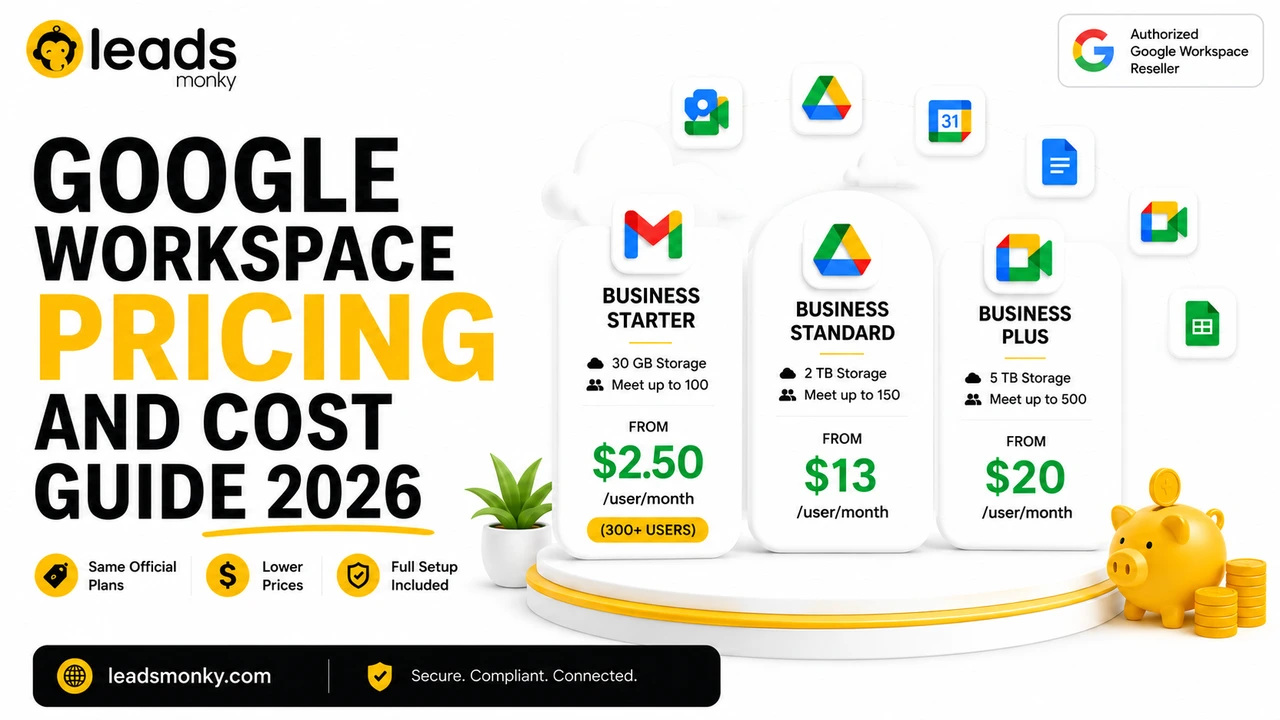
How does Google Workspace reseller pricing compare with Google direct pricing? Leads Monky offers lower monthly pricing than the official Google price anchors used in this comparison. The biggest Starter saving applies when a business has 300 plus users.
Official Google Workspace Starter plan price is $8/user/month, but Leads Monky offers it from $2.50/user/month when you have 300 plus users.
No hidden charges. No extra taxes. The price you see is the price you pay.
| Plan | Official Google Price | Leads Monky Price | Monthly Saving | Yearly Saving |
|---|---|---|---|---|
| Starter, below 300 users | $8/user/month | $3/user/month | Save $5/user/month | Save $60/user/year |
| Starter, 300 plus users | $8/user/month | $2.50/user/month | Save $5.50/user/month | Save $66/user/year |
| Business Standard | $18/user/month | $13/user/month | Save $5/user/month | Save $60/user/year |
| Business Plus | $28/user/month | $20/user/month | Save $8/user/month | Save $96/user/year |
The Starter pricing rule needs careful handling. Leads Monky Starter is $3/user/month for businesses below 300 users. The $2.50 price applies when you have 300 plus users. Do not treat $2.50 as the default price for every Starter buyer.
For a ten person team on Starter, the monthly saving is $50. Over one year, that becomes $600. For a 300 user team on Starter at the 300 plus rate, the monthly saving is $1,650. Over one year, that becomes $19,800.
That is why reseller pricing matters. But price alone should not decide the purchase. A reseller also needs to protect your admin access, configure your setup correctly, and support your team when billing or mailbox issues appear.
For buyers comparing options, Leads Monky is the better value path when you want Google Workspace pricing, setup help, and reseller support together.
Estimate Your Google Workspace Savings
Select your Google Workspace plan and team size to compare Google Direct pricing with your Leads Monky reseller rate.
Use this quick calculator to estimate monthly and yearly savings before choosing your Google Workspace plan.
| Provider | Estimated Cost |
|---|---|
|
Google Direct Standard Google retail price | $160/mo |
|
Leads Monky Price Your exclusive reseller rate | $60/mo |
Savings are estimated using Google Direct pricing compared with Leads Monky reseller pricing. Final pricing may vary by plan, billing terms, and account requirements.
Current Google Workspace Reseller Pricing Snapshot July 2026
What should buyers know about current reseller pricing? Google Workspace pricing changes by plan, billing model, region, and partner offer. Leads Monky currently positions its Google Workspace plans around transparent monthly prices with no hidden charges and no extra taxes.
As things stand, Leads Monky offers Business Starter at $3/user/month below 300 users, Business Starter at $2.50/user/month for 300 plus users, Business Standard at $13/user/month, and Business Plus at $20/user/month.
That gives buyers a simple comparison point.
If you already know your user count and preferred plan, you can estimate monthly and yearly savings before you speak to sales. If you do not know your plan yet, choose the plan based on storage, meeting needs, security needs, and support requirements first.
Which Google Workspace Plan Should You Buy Through A Reseller?
Which Google Workspace plan should you choose through a reseller? Most small teams can start with Business Starter if they need professional Gmail and basic collaboration. Growing teams often need Business Standard, while security focused teams usually need Business Plus.
Business Starter works best when your team needs business email, Google Calendar, Meet, Docs, Sheets, and basic Drive storage. It is the cleanest fit for small businesses, founders, agencies, consultants, and teams with light file storage needs.
Business Standard makes more sense when your team collaborates heavily in Drive, runs longer meetings, records calls, or manages more internal documents. Storage becomes the main reason many teams move from Starter to Standard.
Business Plus fits teams that care more about security, retention, device controls, and stronger admin features. It can also make sense when the cost of poor security is higher than the plan difference.
A simple plan rule works well.
Choose Starter for business email and basic collaboration. Choose Standard when storage and meetings matter. Choose Plus when security and control matter.
A good reseller should not push every buyer into the highest plan. The better move is license tier optimization. That means matching each user group to the lowest suitable plan while keeping the business protected.
For example, a company may place general staff on Starter, leadership or operations on Standard, and security sensitive roles on Plus if the setup allows that approach. The goal is not to pay less at all costs. The goal is to avoid paying for features your team will not use.
💡 Need help setting up Google Workspace?
We’re certified Google partners offering 64% off + free professional setup ($2,000 value). Used by 1000+ companies.
Get your quote →How To Compare Google Workspace Resellers Fairly
How should you compare Google Workspace resellers? Compare the full buying experience, not only the monthly license price. A fair comparison checks pricing, setup scope, admin ownership, support response, migration help, license advice, and exit terms.
Start with pricing transparency. A reseller should show the plan price clearly and explain whether setup fees, taxes, migration fees, or renewal changes apply. If the price looks attractive but the terms are unclear, slow down.
Next, check setup scope. Domain verification, MX records, SPF, DKIM, and DMARC matter because they affect email delivery and account security. If the reseller sells Workspace but leaves you alone during setup, the service value drops.
Then check support. Ask how you contact support, what hours they cover, how billing issues get handled, and whether they help with license changes. A medium sized business needs a different support experience than a solo founder.
Ownership matters most.
You should know who controls the Google Admin console, who can add or remove users, who controls billing, and how you can transfer away if needed. Never accept vague answers here.
A practical reseller scorecard should include these seven checks.
- Clear monthly pricing
- No hidden charges
- Full admin ownership
- DNS and email setup support
- Migration guidance
- License tier advice
- Clean offboarding process
If a reseller passes all seven, the price comparison becomes meaningful. If a reseller fails ownership or offboarding, the low price is not worth the risk.
Best Google Workspace Reseller Comparison By Buyer Type
Who is the best Google Workspace reseller for your situation? The best reseller depends on your user count, support needs, migration complexity, and reason for buying Workspace. Small teams, 300 plus user teams, outbound email teams, and mid market companies should not use the same evaluation lens.
For small teams, the best reseller gives low monthly pricing and hands on setup support. These buyers usually need help verifying the domain, creating mailboxes, and getting Gmail working without technical confusion.
For 300 plus user teams, pricing becomes more powerful. Leads Monky Starter drops to $2.50/user/month at 300 plus users, which creates a much larger yearly saving. At that size, buyers should also check migration planning, billing workflow, and support response.
For outbound email teams, the best reseller understands infrastructure. Workspace accounts alone do not solve outbound email. Domain separation, DNS authentication, mailbox setup, sending limits, and reputation management all matter.
For mid market companies, the best reseller gives a more structured support experience. License tier optimization, migration planning, admin governance, and response quality become more important than saving a few dollars on one mailbox.
| Buyer Type | Best Fit | Why It Matters |
|---|---|---|
| Small business below 50 users | Leads Monky | Lower monthly pricing, setup help, and human support |
| Growing team from 50 to 299 users | Leads Monky | Strong pricing and support during user growth |
| Team with 300 plus users | Leads Monky | Starter price drops to $2.50/user/month |
| Outbound email team | Reseller with setup expertise | DNS, authentication, and mailbox setup matter |
| Mid market company | Support focused reseller | Migration, billing, licenses, and admin control matter |
| Technical DIY team | Google direct or low touch reseller | Works when your team can manage everything internally |
The honest truth is that no reseller is best for every buyer. A solo founder with strong technical skills may prefer direct Google signup. A growing company that wants setup support and better pricing will usually get more value from a reseller.
What To Verify Before Choosing A Google Workspace Reseller
What should you verify before choosing a Google Workspace reseller? Confirm authorization, admin ownership, setup scope, billing terms, migration support, support access, and exit rights before you pay. A reseller should make Workspace easier to manage, not harder to leave.
Ask these questions before you buy.
- Are you an authorized Google Workspace reseller?
- What exact plan am I buying?
- What is the price per user per month?
- Are there setup fees, hidden charges, or extra taxes?
- Will I receive full Google Admin console access?
- Who controls billing and renewals?
- Do you configure domain verification and MX records?
- Do you configure SPF, DKIM, and DMARC?
- Do you help migrate existing email?
- What support channels do you offer?
- How quickly do you respond to urgent issues?
- Can I transfer away later if needed?
- What happens if I add or remove users?
- Do you help choose the right license tier?
The most common mistake is asking only about price. Price matters, but admin control matters more. If your reseller controls too much and explains too little, you may save money at first and lose flexibility later.
For a business using email every day, Workspace is not just another subscription. It holds communication, files, calendars, meetings, and access workflows. Treat the reseller decision like an infrastructure decision.
Google Workspace Reseller For Outbound Email: Same Product, Different Risk
Should outbound email teams use a Google Workspace reseller? Yes, when the reseller understands domain setup, mailbox creation, DNS authentication, and ownership rules. Outbound email teams should care about infrastructure control as much as they care about mailbox pricing.
Outbound email buyers have different needs from normal business email buyers. A standard company may need ten employee inboxes. An outbound team may need multiple domains, multiple mailboxes, authentication records, warm up planning, and careful sending infrastructure.
That changes the comparison.
For normal business email, you mostly compare price, support, migration, and admin control. For outbound email, you also compare domain separation, DNS quality, mailbox replacement policy, authentication setup, and deliverability readiness.
This is where many low price offers fail. They sell mailboxes but do not explain the infrastructure behind those mailboxes. The result can be poor delivery, confused ownership, and difficult troubleshooting.
An outbound email team should ask one extra question.
Who owns the domains, mailboxes, Admin console, and recovery path?
If the answer is not clear, do not move forward.
Direct Purchase, Reseller, Or Deal Marketplace: Which Gives Better Value?
Should you buy Google Workspace direct, through a reseller, or through a deal marketplace? Buy direct when you want a simple self managed setup. Use a reseller when you want better pricing, setup support, migration help, and human assistance.
Google direct works when your team already knows how to manage Workspace. You control the purchase, setup, billing, users, and admin configuration. For technical teams with simple needs, that can be enough.
A reseller works better when you want a guided setup. That includes domain verification, business email setup, license advice, billing help, migration planning, and faster human support.
Deal marketplaces require more caution. They may offer attractive first term pricing, but you need to understand renewal terms, ownership, support responsibility, billing control, and what happens when the deal ends.
The best value does not always mean the lowest first month price.
The best value means the lowest suitable price with the least operational risk.
For most growing businesses, an authorized reseller with transparent pricing and setup support creates a stronger buying path than a short term marketplace deal.
Common Mistakes When Comparing Google Workspace Resellers
What mistakes do buyers make during a Google Workspace reseller comparison? Buyers often focus on the monthly price and ignore support, ownership, migration, and exit terms. That creates problems after the purchase.
The first mistake is choosing only by price. A low price helps, but only when the reseller also gives proper setup and support.
The second mistake is not confirming Admin console ownership. Your business should understand who has super admin access and who can change critical settings.
The third mistake is ignoring email authentication. SPF, DKIM, and DMARC help protect sending reputation and reduce email delivery problems.
The fourth mistake is buying the wrong plan. Starter works for many small teams, but it may not fit a storage heavy company. Standard or Plus may be the smarter choice when collaboration or security needs rise.
The fifth mistake is ignoring offboarding. You should know how to transfer away before you sign up.
Good buyers ask boring questions early. Bad reseller decisions usually come from questions nobody asked.
How To Choose The Right Google Workspace Reseller
How do you choose the right Google Workspace reseller? Choose the reseller that combines transparent pricing, full admin control, proper setup, responsive support, and clean transfer options. A reseller should lower friction, not create dependency.
Use this simple process.
- Count your users today.
- Estimate your user count for the next twelve months.
- Choose Starter, Standard, or Plus based on real needs.
- Compare the official Google price with reseller pricing.
- Ask what setup includes.
- Confirm Admin console ownership.
- Check support channels and response expectations.
- Ask whether migration help is included.
- Confirm offboarding terms.
- Choose the reseller that gives the strongest total value.
For most small businesses, Leads Monky is a strong fit because the pricing is transparent, Starter begins at $3/user/month below 300 users, and 300 plus user accounts can qualify for $2.50/user/month.
For businesses that need heavy enterprise procurement, advanced compliance review, or a direct contract with Google, direct buying may still make sense. That is the honest limitation. A reseller is best when the buyer values partner pricing, setup support, and ongoing help.
Final Recommendation
What is the best way to compare Google Workspace resellers? Compare the reseller as a business partner, not just as a license seller. The right reseller should save money, protect admin control, simplify setup, support migration, and help you avoid the wrong license tier.
Google Workspace Reseller Comparison becomes simple when you use the right framework. Start with plan fit. Then compare pricing. Then check setup, support, ownership, migration, and offboarding. If the reseller passes those checks, the price has real meaning.
Leads Monky is trusted by 1,000 plus companies for reliable Google Workspace solutions, business email setup, migration, and ongoing support. If you want to compare your current Workspace cost with the latest Leads Monky pricing, contact info@leadsmonky.com and ask for a plan review before buying direct.
FAQ
What is a Google Workspace reseller?
A Google Workspace reseller is an authorized partner that sells Google Workspace subscriptions and may provide setup, billing help, migration, license advice, and support. The apps remain Google Workspace, but the service experience can differ.
What is the difference between Google Workspace direct and reseller buying?
Direct buying means you purchase from Google and manage setup yourself. Reseller buying means a partner can help with pricing, setup, support, billing, migration, and license optimization.
How much does Google Workspace cost through a reseller?
With Leads Monky, Starter costs $3/user/month below 300 users and $2.50 for 300 plus users. Business Standard costs $13/user/month. Business Plus costs $20/user/month.
Which Google Workspace reseller can help optimize license tiers and save money?
A reseller that reviews user roles, storage needs, meeting needs, and security requirements can help optimize license tiers. Leads Monky is a strong fit for teams that want partner pricing and setup support.
Who is the best Google Workspace reseller for mid market companies in the US?
The best reseller for a mid market company should offer transparent pricing, migration help, admin control, license guidance, and responsive support. Leads Monky is worth comparing when pricing and setup support both matter.
Is it safe to buy Google Workspace through an authorized reseller?
Yes, buying through an authorized reseller can be safe when you confirm admin ownership, billing terms, support access, and transfer rights. Do not buy from any provider that avoids those questions.
Does a Google Workspace reseller include DNS setup, SPF, DKIM, and DMARC?
Some resellers include DNS and email authentication setup, while others only sell licenses. Ask before you buy. These settings matter for email delivery, security, and outbound email infrastructure.
Static note: All answers in this FAQ were last verified in July 2026. Contact info@leadsmonky.com for the most current information.
Ready to Fix Your Cold Email?
What you get:
- ✓ Complete infrastructure: 30 emails + 10 domains
- ✓ 10,000 personalized emails monthly
- ✓ First consultations in 5–6 weeks