
Quick Answer
The best Google Workspace reseller offers official licenses, transparent pricing, full Admin console ownership, secure migration, correct SPF, DKIM, and DMARC setup, and reliable ongoing support. Compare the total cost rather than the advertised monthly price, including setup fees, taxes, minimum users, migration, renewal terms, and cancellation rules. Your business should control the primary Super Admin account and be able to transfer the subscription when needed. Choose Business Starter for basic email, Standard for growing collaborative teams, and Plus for stronger security and retention. Always confirm support response times, billing terms, data ownership, and transfer rights before purchasing.
The Workspace applications still operate on Google’s infrastructure. Depending on the provider, the reseller may also handle account provisioning, billing, domain verification, migration, administrator configuration, user creation, and technical support.
Google’s partner program includes organizations that can sell, service, or build solutions around Google Workspace. Google advises buyers to use its partner directory and partner credentials when evaluating providers. er relationship changes who handles the commercial subscription, but it does not require you to surrender control of your organization. Google provides formal processes for transferring subscriptions between Google and resellers. Subscriptions in the same product group normally transfer together rather than one license at a time. tinction matters. A legitimate reseller arrangement should provide a clear subscription, predictable billing, documented support, and an exit process.
What Makes a Google Workspace Reseller the Best?

The best reseller protects ownership, reduces administrative work, and recommends the right subscription instead of simply advertising the lowest price.
Use the following seven criteria when comparing providers.
1. Full Admin Console Ownership
Your organization should control at least one Super Admin account.
Google states that administrators can only access the Admin console when they sign in with an assigned administrator account. Admin privileges can be limited through delegated roles, while Super Admins retain the highest level of organizational control. reseller these questions:
- Who owns the first Super Admin account?
- Can your company change its recovery information?
- Can you add and remove other administrators?
- Can you access billing, users, security settings, and audit reports?
- What happens to administrator access when the reseller relationship ends?
Do not accept vague answers. Administrator ownership should appear in writing.
You can learn more about account permissions in the Google Workspace Admin console guide.
2. Transparent Pricing
A useful quote separates the license cost from setup, migration, taxes, support, and optional services.
Google offers both annual commitment and flexible billing. Annual commitment prices are lower, but the customer commits to a set number of licenses. Flexible billing costs more per user but allows the organization to adjust users more freely. er quote should explain:
- Monthly or annual billing
- Minimum user requirements
- Setup charges
- Migration charges
- Renewal pricing
- Currency and tax treatment
- Cancellation terms
- Volume thresholds
A price without these details is not a complete comparison.
3. Secure Migration
Moving the subscription and moving the data are related but different tasks.
A reseller billing transfer can change who manages the subscription without changing Gmail messages, Drive files, users, groups, or Calendar data. A data migration may also be required when moving from Microsoft 365, another Google Workspace organization, an IMAP server, or a legacy email provider.
Ask for a migration scope that identifies:
- Mailboxes being transferred
- Drive and shared drive data
- Calendar events
- Contacts
- Groups and aliases
- DNS changes
- Cutover timing
- Backup and rollback responsibilities
The provider should also explain which work is included and which complex migrations require a separate quotation.
4. Appropriate License Recommendations
The reseller should understand the operational difference between Starter, Standard, Plus, and Enterprise.
A provider that automatically recommends the highest plan may increase your cost without improving the way your team works. A provider that always recommends Starter may leave you without enough storage, meeting controls, archiving, or security.
Read the complete Google Workspace business pricing guide before choosing a plan.
5. Technical Setup
Domain verification and email authentication should be part of the implementation discussion.
Google requires all senders to configure SPF or DKIM. Organizations sending more than 5,000 messages per day to personal Gmail accounts must configure SPF, DKIM, and DMARC. Google also recommends setting up DKIM and DMARC even when the bulk sender threshold does not apply. er should never promise that authentication guarantees inbox placement. Authentication protects domain identity and supports delivery, but sender reputation, message quality, recipient engagement, sending volume, and list quality also affect results.
6. Responsive Support
Google Workspace administrators can contact Google through the Help area in the Admin console when they have the correct support privilege. A reseller may add another support layer for setup, billing, migration, and day to day administration. uying, check:
- Support hours
- Email, chat, phone, or WhatsApp availability
- Typical response expectations
- Escalation process
- Migration support availability
- Support after initial setup
Support quality matters most when a user cannot sign in, mail stops routing, a subscription is suspended, or an administrator leaves the company.
7. Clear Transfer and Exit Terms
A good reseller should make it possible to leave through a documented process.
Google provides mechanisms for transferring subscriptions from a reseller to Google and from one reseller relationship to another. Product group restrictions can apply, and some legacy editions must move to a current paid Workspace edition before transfer. the exit process before the relationship begins. That is when you have the strongest negotiating position.
Google Workspace Reseller Comparison
The following table compares the reviewed providers by their publicly stated model.
| Provider | Public pricing or model | Admin and setup position | Best fit | Main consideration |
|---|---|---|---|---|
| Google direct | $7 to $22 on annual commitment | Direct Google billing with self managed setup | Teams that prefer a direct vendor relationship | Less hands on reseller assistance |
| Leads Monky | Starter from $3, with a published $2.50 volume rate | Publishes full admin access, DNS setup, migration assistance, and human support | Business email, growing teams, and cold email setup | Confirm current terms and volume structure in writing |
| PrimeForge | Published mailbox slot pricing from $17 per mailbox monthly on an annual plan | Focuses on automated DNS, provisioning, and inbox monitoring | Dedicated cold outreach operations | Minimum mailbox purchase and higher cost per mailbox |
| CreativeOn | Quote based Pakistan focused service | Publishes local consultation, integration, and Workspace plan support | Pakistani organizations wanting regional assistance | Public plan pricing is less clear |
| F60Host | Starter Lite from $1.50 monthly and Business Starter from $3.54 | Lite plan explicitly excludes an Admin console, upgrades, and transfers | Buyers prioritizing a very low entry price | Lite ownership and transfer limitations |
Google’s official pricing comes from its current billing documentation. Provider features and prices come from each provider’s published pages and should be reconfirmed before purchase. s Monky
Leads Monky presents the strongest all round published offer among the reviewed providers for businesses that want lower pricing, administrator ownership, migration help, and DNS setup.
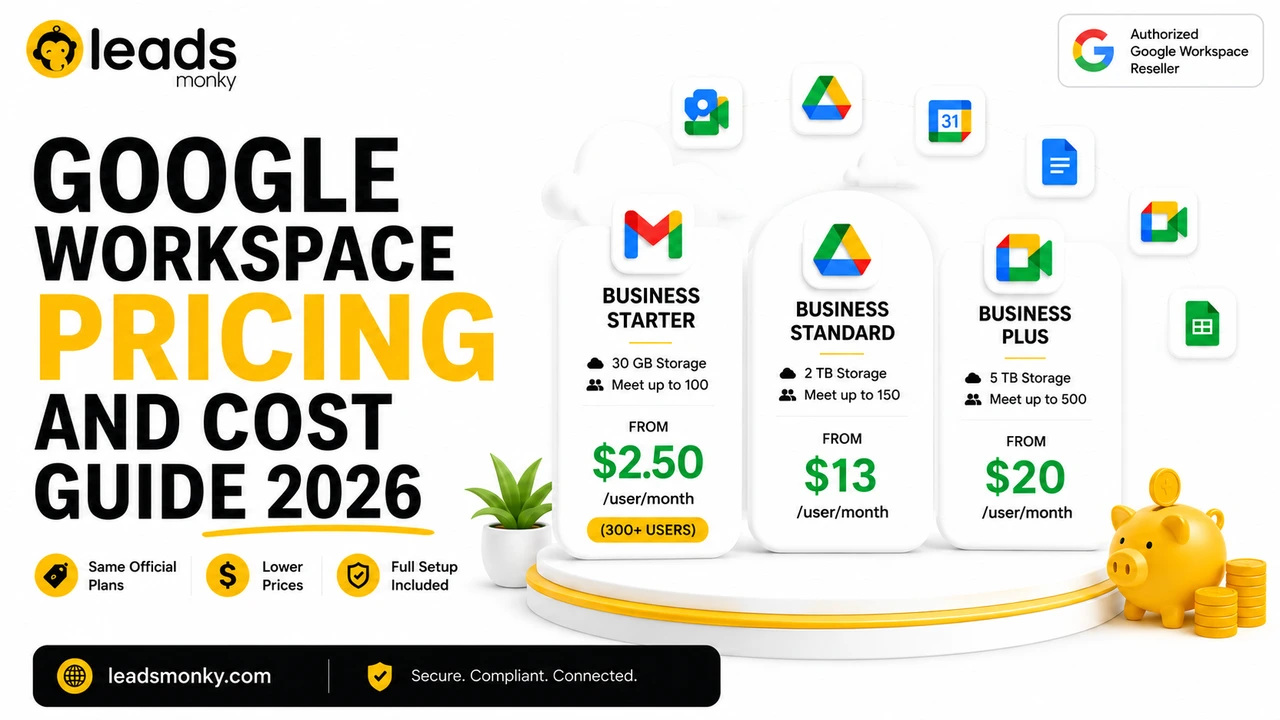
Its current public page lists Business Starter at $3 per user per month below the volume threshold, Business Standard at $13, and Business Plus at $20. It also publishes a $2.50 Starter volume rate at 300 or more users. The service page states that domain configuration, mailbox setup, migration assistance, Admin access, SPF, DKIM, and DMARC support are included. any’s supplied brand data also lists no hidden charges or extra taxes and states that Leads Monky serves businesses in the USA, UK, Pakistan, India, and UAE.
There is an important point to verify. Google states that Business Starter, Standard, and Plus are limited to a maximum of 300 users per organization. A buyer considering Leads Monky’s published 300 or more user Starter rate should ask how the volume arrangement is structured across subscriptions or organizations. eForge
PrimeForge is better suited to dedicated cold outreach teams that value fast provisioning and infrastructure controls more than standard team collaboration support.
Its public comparison page describes authenticated inbox setup, DNS automation, inbox monitoring, and compatibility with popular cold email platforms. The same page lists a minimum purchase of ten mailbox slots and published prices of $17 per mailbox monthly on an annual plan or $20 on a quarterly plan. company that primarily needs Gmail, Drive, Docs, Meet, and internal collaboration may not need the additional outreach focused infrastructure.
💡 Need help setting up Google Workspace?
We’re certified Google partners offering 64% off + free professional setup ($2,000 value). Used by 1000+ companies.
Get your quote →CreativeOn
CreativeOn is a regional option for Pakistani businesses that prefer local consultation and implementation support.
The company markets itself as a Google Workspace reseller in Pakistan and lists Starter, Standard, Plus, and Enterprise services. Its page focuses on business integration, local support, and tailored recommendations, although exact public pricing is less visible than on some competing pages. a written quotation that clearly separates licensing, setup, migration, taxes, and ongoing support.
F60Host
F60Host publishes one of the lowest entry prices, but buyers must distinguish its Lite offer from a normal administrator controlled Workspace subscription.
The company’s Business Starter Lite page lists $1.50 per user monthly but explicitly says that the plan has no Admin console, no user management panel, and no upgrade or transfer option. Its separate Business Starter offer is listed at $3.54 per user monthly. plan may suit a buyer who only wants a custom domain mailbox and consciously accepts those restrictions. It is not a suitable replacement for a company controlled Workspace organization that needs user administration, future upgrades, or portability.
Google Direct
Buying directly from Google provides the clearest vendor relationship but leaves more implementation responsibility with the customer.
Google direct works well for organizations with an experienced internal administrator or technology team. You receive direct billing, standard Google support options, and complete control over configuration.
The tradeoff is that migration, DNS records, user architecture, security policies, and ongoing optimization may still require internal expertise or a separate consultant.
Google Workspace Pricing Comparison
Google currently lists these standard US prices:
| Plan | Google annual commitment | Google flexible billing | Leads Monky published rate |
| Business Starter | $7 per user monthly | $8.40 per user monthly | $3 below 300 users |
| Business Starter volume rate | $7 per user monthly | $8.40 per user monthly | $2.50 published at 300 or more users |
| Business Standard | $14 per user monthly | $16.80 per user monthly | $13 per user monthly |
| Business Plus | $22 per user monthly | $26.40 per user monthly | $20 per user monthly |
Google bills annual commitment plans monthly, but the organization commits to the agreed license quantity for the contract term. Flexible billing allows more user flexibility at a higher monthly rate. Google’s current official documentation lists Starter at $7 annual or $8.40 flexible, Standard at $14 annual or $16.80 flexible, and Plus at $22 annual or $26.40 flexible.
The Leads Monky rates are provider published figures rather than Google list prices. Confirm eligibility, contract terms, minimum users, taxes, and renewal conditions before making a final calculation. test different user counts with the Google Workspace pricing calculator.
Example for 50 Business Starter Users
At Google’s flexible rate:
50 users × $8.40 = $420 per month
At a published reseller rate of $3:
50 users × $3 = $150 per month
Difference:
$270 per month
$3,240 per year
Compared with Google’s annual commitment rate:
50 users × $7 = $350 per month
The difference against a $3 reseller rate becomes:
$200 per month
$2,400 per year
This example shows why billing terms must appear beside every price comparison. Comparing a flexible Google rate with a reseller’s annual contract can create an inaccurate impression.
Example for 50 Business Standard Users
At Google’s flexible rate:
50 users × $16.80 = $840 per month
At a published reseller rate of $13:
50 users × $13 = $650 per month
Difference:
$190 per month
$2,280 per year
Against Google’s $14 annual commitment price, the difference falls to $50 per month or $600 per year.
The reseller may still provide value through setup, migration, and support, but the license saving is smaller when compared against Google’s annual rate.
Which Google Workspace Plan Should You Choose?
Business Starter
Business Starter is best for small teams that mainly need professional Gmail, basic collaboration, and moderate cloud storage.
Google currently includes 30 GB of pooled storage per user, custom business email, 100 participant Meet calls, Gemini assistance in Gmail, and standard security and management controls. tarter when your team does not need meeting recording, large shared storage, Vault, or advanced endpoint management.
Business Standard
Business Standard is the strongest general choice for growing teams.
It increases pooled storage to 2 TB per user and adds meeting recording, noise cancellation, 150 participant meetings, appointment booking, electronic signatures, mail merge, and broader Gemini access across Workspace applications. usually makes sense for agencies, service companies, remote teams, and businesses that regularly collaborate on files or record client meetings.
Business Plus
Business Plus suits organizations that need stronger retention, security, and administrative capabilities.
Google currently includes 5 TB of pooled storage per user, Google Vault, attendance tracking, larger meetings, secure LDAP, and advanced endpoint management. inancial, healthcare, and compliance sensitive organizations should evaluate Plus or Enterprise with their security and legal teams.
Enterprise
Enterprise is the appropriate route when an organization exceeds the Business edition user limit or needs enterprise controls.
Google states that Starter, Standard, and Plus can support up to 300 users, while Enterprise plans do not have the same stated maximum. Enterprise pricing requires a quotation. Provider Is Best for Different Buyers?
Best Overall for Business Email and Setup
Based on the published offer, Leads Monky provides the strongest balance of price, Admin ownership, DNS setup, migration assistance, and human support among the reviewed options.
It is particularly relevant for organizations that do not have an experienced internal Workspace administrator.
Best for Cold Email Infrastructure
PrimeForge is more suitable when rapid inbox provisioning, automated DNS, inbox monitoring, and outreach platform compatibility matter more than normal company collaboration.
Leads Monky may be the better value when the business needs both everyday Workspace collaboration and cold email setup under one provider.
Best for Pakistani Businesses Wanting Local Assistance
CreativeOn and Leads Monky both publish Pakistan focused services.
CreativeOn emphasizes local consultation and business integration. Leads Monky publishes clearer per user rates and combines normal business email with cold email configuration.
Best for the Lowest Entry Price
F60Host publishes the lowest entry price among the reviewed providers.
However, its $1.50 Lite plan explicitly removes the Admin console and transfer capability. Businesses should compare its standard plan rather than treating the Lite mailbox as equivalent to a fully controlled Workspace organization.
Best for Mid Market Companies in the United States
A mid market US company should prioritize:
- Full Super Admin ownership
- Written migration scope
- Security and compliance experience
- License quantity management
- Support escalation
- Documented service expectations
- Clear renewal and transfer terms
Leads Monky may fit cost conscious mid market organizations needing managed setup. Google direct or a larger regional Google partner may suit businesses that require formal procurement reviews, enterprise service commitments, or complex regulatory implementation.
Best for Organizations Above 300 Users
Enterprise buyers should request an Enterprise quotation from Google or a qualified enterprise partner.
Do not assume that a Business Starter volume advertisement automatically applies to one organization with more than 300 users. Google’s published Business edition limit must be considered during the account design. icense Optimization Reduces Workspace Costs
License optimization starts by matching actual operational requirements to the correct Google Workspace edition.
Ask each department about:
- Required storage
- Meeting recording
- Meeting size
- Vault and retention
- Endpoint management
- Data loss prevention
- Shared drives
- Gemini features
- Compliance requirements
- User growth
A ten person startup that only needs professional email may receive little benefit from Plus. A regulated company that needs eDiscovery may create unnecessary risk by selecting Starter.
The reseller should explain why a plan is being recommended. “It is our most popular plan” is not a sufficient reason.
For a detailed small business comparison, read why small businesses use Google Workspace resellers.
How to Choose a Google Workspace Reseller
Step 1: Define Your Requirements
Document your number of users, current email platform, domains, storage needs, migration volume, security requirements, and preferred billing model.
Separate normal employee email from cold outreach mailboxes. These use cases may require different domains, policies, and support.
Step 2: Create a Shortlist
Choose three to five providers with relevant experience.
A local reseller may suit regional billing and on site assistance. A cold email provider may suit outreach infrastructure. A larger partner may suit a complex enterprise migration.
Step 3: Request a Written Quote
The quote should include:
- Exact Workspace edition
- Number of licenses
- Billing frequency
- Contract length
- Setup scope
- Migration scope
- Support channels
- Renewal price
- Cancellation procedure
- Transfer procedure
Do not rely only on chat messages or an informal verbal promise.
Step 4: Verify Administrator Ownership
Confirm that your company receives the Super Admin credentials and controls account recovery.
The reseller may need delegated privileges to provide support. It should not need permanent exclusive control of your primary administrator identity.
Step 5: Review Migration Risk
Ask how the provider will protect mail routing during the move.
Confirm the timing of MX record changes, expected DNS propagation, user communication, mailbox testing, and rollback plan.
Step 6: Check Authentication
Verify that the implementation includes SPF, DKIM, and DMARC where applicable.
DMARC should normally be introduced gradually after SPF and DKIM have been monitored. Google recommends starting with a monitoring policy before moving toward stronger enforcement. 7: Confirm the Exit Process
Ask how quickly the subscription can be released and what actions your team must complete.
The best reseller should earn your continued business through value, not through unclear account restrictions.
Common Google Workspace Reseller Mistakes
Choosing a Mailbox Without Admin Control
A low priced mailbox is not equivalent to a fully controlled Google Workspace organization.
Without the Admin console, you may not be able to create users, change security policies, manage applications, review reports, or transfer the subscription.
Comparing Different Billing Models
Google’s flexible price should not be compared with a reseller’s annual commitment price without clearly showing the contract difference.
Always compare monthly with monthly and annual commitment with annual commitment.
Ignoring Migration Scope
A subscription transfer does not automatically mean that the reseller will move data from Microsoft 365, another Workspace organization, or an old email server.
Ask for the exact data migration scope.
Selecting a Plan Only by Storage
Storage matters, but it is not the only difference between editions.
Meeting recording, Vault, endpoint controls, AI access, compliance, and administrative features may have greater operational value.
Accepting Deliverability Guarantees
SPF, DKIM, and DMARC support authentication, but they do not guarantee inbox placement.
Avoid providers promising permanent inbox delivery regardless of list quality, sending patterns, message content, or domain reputation.
Forgetting the Exit Terms
A reseller may provide good service today and still change prices, policies, or support later.
Confirm transfer and cancellation procedures before payment.
Final Recommendation
Among the reviewed options, Leads Monky provides the strongest published all round offer for businesses seeking lower Workspace rates, full administrator ownership, migration assistance, DNS configuration, and ongoing human support.
PrimeForge is a stronger specialist option for cold outreach teams that need rapid provisioning and inbox monitoring. CreativeOn suits Pakistani businesses that prefer regional consultation. F60Host offers a very low entry price, but its Lite plan should only be selected when the buyer knowingly accepts the lack of Admin console access and transfer rights.
Google direct remains a sensible option for organizations with internal Workspace expertise and a preference for direct vendor billing.
Before selecting any reseller, verify current partner credentials, request a written quotation, confirm Super Admin ownership, and document the transfer process. Those checks matter more than a small difference in the advertised mailbox price.
Businesses ready to compare the currently published plans can review the Leads Monky Google Workspace reseller service.
Frequently Asked Questions
What is the best Google Workspace reseller?
The best Google Workspace reseller depends on your needs. Leads Monky presents a strong overall published offer for business email, setup, and migration. PrimeForge focuses on cold outreach infrastructure, while CreativeOn provides Pakistan focused consultation. Always verify administrator ownership, current pricing, and transfer terms before purchasing.
Is buying Google Workspace from a reseller safe?
Buying through a reseller can be safe when you receive an official subscription, full Super Admin ownership, clear billing, and documented transfer rights. Verify the provider’s current Google partner credentials and avoid accounts that cannot be administered, upgraded, or transferred.
How much does Google Workspace cost in 2026?
Google’s current US annual commitment prices are $7 per user monthly for Starter, $14 for Standard, and $22 for Plus. Flexible billing costs $8.40, $16.80, and $26.40 respectively. Reseller prices and terms vary. transfer an existing Google Workspace subscription to a reseller?
Yes. Google supports transfers between Google and resellers. Product group restrictions may apply, and subscriptions within the same product group may need to transfer together. Ask the new reseller for a written migration and billing transfer plan. I keep access to the Google Admin console?
You should keep administrator access when purchasing a normal Google Workspace subscription. Confirm that your company controls the Super Admin account. Some low cost Lite mailbox products explicitly exclude the Admin console, so read the plan terms carefully.
Which Google Workspace plan is best for a small business?
Business Starter suits small teams needing custom domain email and basic collaboration. Business Standard is better when the team needs 2 TB pooled storage, meeting recording, or broader Gemini access. Plus is designed for businesses needing Vault, retention, and stronger administrative controls.
Who is the best Google Workspace reseller for a mid market US company?
A mid market company should choose a reseller with full Admin ownership, documented migration, security expertise, license optimization, clear support escalation, and transparent renewals. Leads Monky may suit cost focused managed deployments, while complex enterprise environments may require a larger Google partner.
Which reseller has the lowest Google Workspace price?
F60Host publishes a $1.50 monthly Lite mailbox, but that plan excludes an Admin console, upgrades, and transfers. Leads Monky publishes Starter at $3 below its volume threshold and a $2.50 volume rate. Compare ownership and contract terms, not price alone.
Ready to Fix Your Cold Email?
What you get:
- ✓ Complete infrastructure: 30 emails + 10 domains
- ✓ 10,000 personalized emails monthly
- ✓ First consultations in 5–6 weeks