
Quick Answer
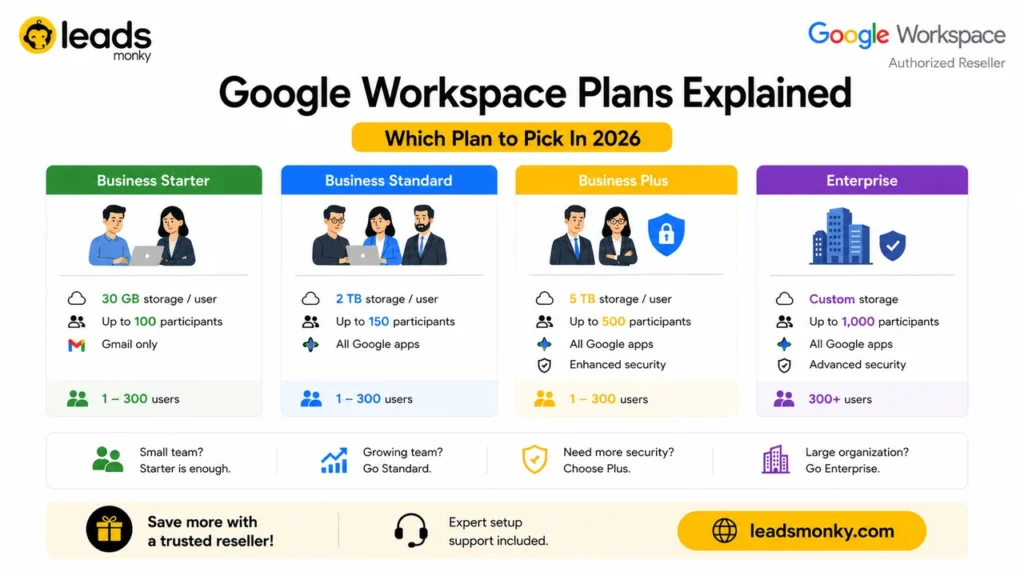
Google Workspace has four main plans: Business Starter, Business Standard, Business Plus, and Enterprise. Business Standard is the right default for most growing teams. Choose Starter only for very small teams with light needs, and choose Plus or Enterprise if you need Google Vault, eDiscovery, or advanced compliance controls like HIPAA’s Business Associate Agreement with retention features.
Choosing a Google Workspace plan comes down to matching three things to your team: storage needs, meeting and collaboration features, and compliance requirements. Google Workspace offers four main business tiers, Business Starter, Business Standard, Business Plus, and Enterprise, each building on the last with more storage, stronger security, and deeper admin controls. This guide breaks down what each plan actually includes, where the real differences sit, and which plan fits which kind of team, so you can pick once and not need to revisit the decision every few months.
Google Workspace Business Starter: Who It’s Actually For

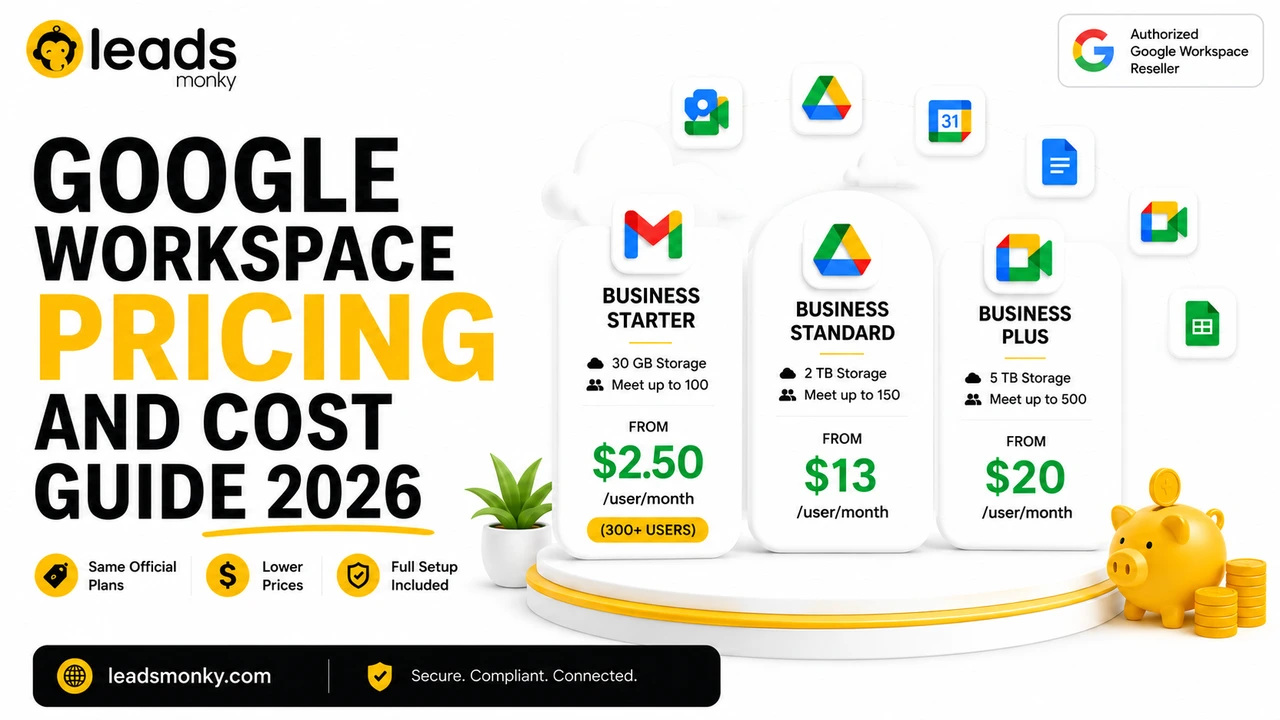
Business Starter is the right plan for freelancers, very small teams, and businesses that mainly need professional email and light document collaboration. It includes custom domain email, 30 GB of pooled storage per user, Google Meet for up to 100 participants, and basic Gemini access in Gmail.
What Starter does not include matters as much as what it does. There’s no meeting recording, no shared drives, and no Google Vault. For a five-person consulting business that lives mostly in Gmail and Docs, none of that is a real loss. For a team that regularly records client calls or needs centralized file storage that survives an employee leaving, Starter will feel limiting within a few months.
Honest limitation worth naming directly: Starter’s 30 GB storage limit is per user but pooled across the organization, and it gets tight fast once anyone starts storing large files, recordings, or design assets. If storage growth is predictable, it’s worth budgeting for Standard from day one rather than migrating later.
Google Workspace Business Standard: The Default Most Teams Should Pick
Business Standard is the practical default for most growing businesses, and it’s the tier Google itself nudges most new customers toward. It expands on Starter with 2 TB of pooled storage per user, Google Meet for up to 150 participants with recording, shared drives, and full Gemini access across Gmail, Docs, Sheets, Slides, and Meet.
The jump from Starter’s Gmail-only Gemini to Standard’s full Gemini access is the detail most comparison guides undersell. If your team wants AI help summarizing meetings in Meet or drafting content in Docs and Sheets, not just composing emails, Standard is the actual entry point for that, not Starter.
Standard is the right call for teams of roughly 10 to 100 people doing normal day to day collaboration: shared documents, regular video meetings, and growing file storage. It is not the right call if you need Google Vault for legal hold, retention policies, or eDiscovery. Those features start at Business Plus, and no amount of Standard configuration will produce them.
Google Workspace Business Plus: When Compliance and Security Actually Matter
Business Plus is built for teams with real compliance, security, or retention requirements, not simply teams that want more storage. On top of everything in Standard, it adds Google Vault for eDiscovery and retention, 5 TB pooled storage per user, advanced endpoint management, and Meet for up to 500 participants with attendance tracking.
This is where law firms, healthcare practices, financial services, and government contractors typically land, and for good reason. If your organization needs to retain records for legal hold, search across historical email and chat data, or enforce stricter device management policies, Plus is the lowest tier that actually has those tools.
One thing worth being precise about, since a lot of pricing guides online get this wrong: every paid Google Workspace plan, including Business Starter, qualifies for Google’s HIPAA Business Associate Agreement. HIPAA eligibility is not what separates Plus from Standard. What separates them is Google Vault, which matters for retention and eDiscovery but is a different requirement than HIPAA itself. A healthcare practice on Business Standard with a signed BAA and properly configured security settings can be HIPAA compliant; it just won’t have Vault’s legal hold capabilities unless it moves to Plus.
Google Workspace Enterprise: For Teams Beyond 300 Users or With Custom Needs
Enterprise is the only tier without a 300-user cap, and it exists for organizations that have outgrown Business Plus or need fully customized security and support arrangements. Business Starter, Standard, and Plus are all capped at 300 users combined per domain. Once an organization needs more seats than that, or needs enterprise-grade controls like S/MIME encryption, advanced DLP, or custom support response times, Enterprise is the only option.
Enterprise pricing is custom and requires contacting Google sales directly rather than buying through self-serve checkout. This isn’t a plan most small or mid-size businesses need to seriously evaluate. If your team is comfortably under 300 users and doesn’t have specialized security mandates beyond what Plus offers, Enterprise is very likely more plan than you need.
Can You Mix Different Google Workspace Plans for Different Users
Through standard self-serve checkout, no. Every user on a single Google Workspace domain shares the same plan. This is a real limitation that surprises a lot of growing teams who only want to put a few specific roles on a higher tier while everyone else stays on a cheaper plan.
That said, the full picture is more nuanced than a flat no. Google’s own admin documentation on changing user licenses confirms that if an organization holds multiple active subscriptions for the same domain, individual users can be assigned to different licenses within those subscriptions. This kind of mixed licensing setup isn’t available through the standard self-serve signup flow, but it is something Google Sales or an authorized reseller can configure.
For most small teams, the simpler and more common approach is choosing one plan that covers your highest-need users, then using shared mailboxes or aliases for roles that only need basic email access without a full license.
Common Mistakes When Choosing a Google Workspace Plan
- Picking Starter because it’s cheapest, without checking the Gemini gap. Starter only gets Gemini in Gmail. If your team wants AI features across Docs, Sheets, and Meet, you need Standard at minimum.
- Assuming Plus is required for HIPAA. It isn’t. The BAA is available on all paid plans. Plus is required for Google Vault, which is a separate, related, but distinct requirement.
- Underestimating storage growth on Starter. 30 GB pooled per user disappears quickly once recordings, design files, or large attachments enter the picture.
- Assuming you can mix plans by user through normal checkout. You can’t, without a multi-subscription arrangement, usually set up through a reseller or Google Sales.
- Defaulting to Enterprise out of caution. Enterprise exists for the 300+ user cap and specialized security needs, not as a generically “safer” choice for smaller teams.
Conclusion
Most businesses land on Business Standard, and for good reason: it covers full Gemini access, meeting recordings, shared drives, and enough storage for normal growth without paying for compliance tooling most teams never touch. Starter works for very small, low-complexity teams. Plus earns its price when Vault, retention, or advanced endpoint management are genuine requirements, not nice-to-haves. Enterprise is for organizations past 300 users or with specialized security mandates. Whichever plan fits your team, it’s worth checking reseller pricing before buying direct. Leads Monky, an authorized Google Workspace reseller, offers every Business tier at a lower per-user rate with setup support included.
FAQs
Which Google Workspace plan is best for a small business?
Business Standard is the best fit for most small businesses with 10 or more users. Business Starter works for very small teams under 10 people with light storage and meeting needs.
Which Google Workspace plan is HIPAA compliant?
All paid Google Workspace plans, including Business Starter, qualify for Google’s HIPAA Business Associate Agreement. Google Vault, which is separate from HIPAA eligibility, only starts at Business Plus.
Can you mix Google Workspace plans for different users on the same domain?
Not through standard self-serve checkout, where every user shares one plan. Mixed licensing across multiple subscriptions is possible but typically requires Google Sales or an authorized reseller to set up.
What is the difference between Google Workspace Business Standard and Business Plus?
Business Plus adds Google Vault for retention and eDiscovery, more storage, advanced endpoint management, and larger video meetings with attendance tracking. Business Standard does not include Vault or endpoint management.
How many users can use Google Workspace Business plans?
Business Starter, Standard, and Plus support 1 to 300 users combined per domain. Organizations needing more than 300 users require an Enterprise plan, which has no user maximum.
Is there a free Google Workspace plan?
No, Google Workspace does not offer a free business plan. All Business and Enterprise tiers are paid. Free personal Gmail accounts are not eligible for business features or the HIPAA Business Associate Agreement.
Ready to Fix Your Cold Email?
What you get:
- ✓ Complete infrastructure: 30 emails + 10 domains
- ✓ 10,000 personalized emails monthly
- ✓ First consultations in 5–6 weeks